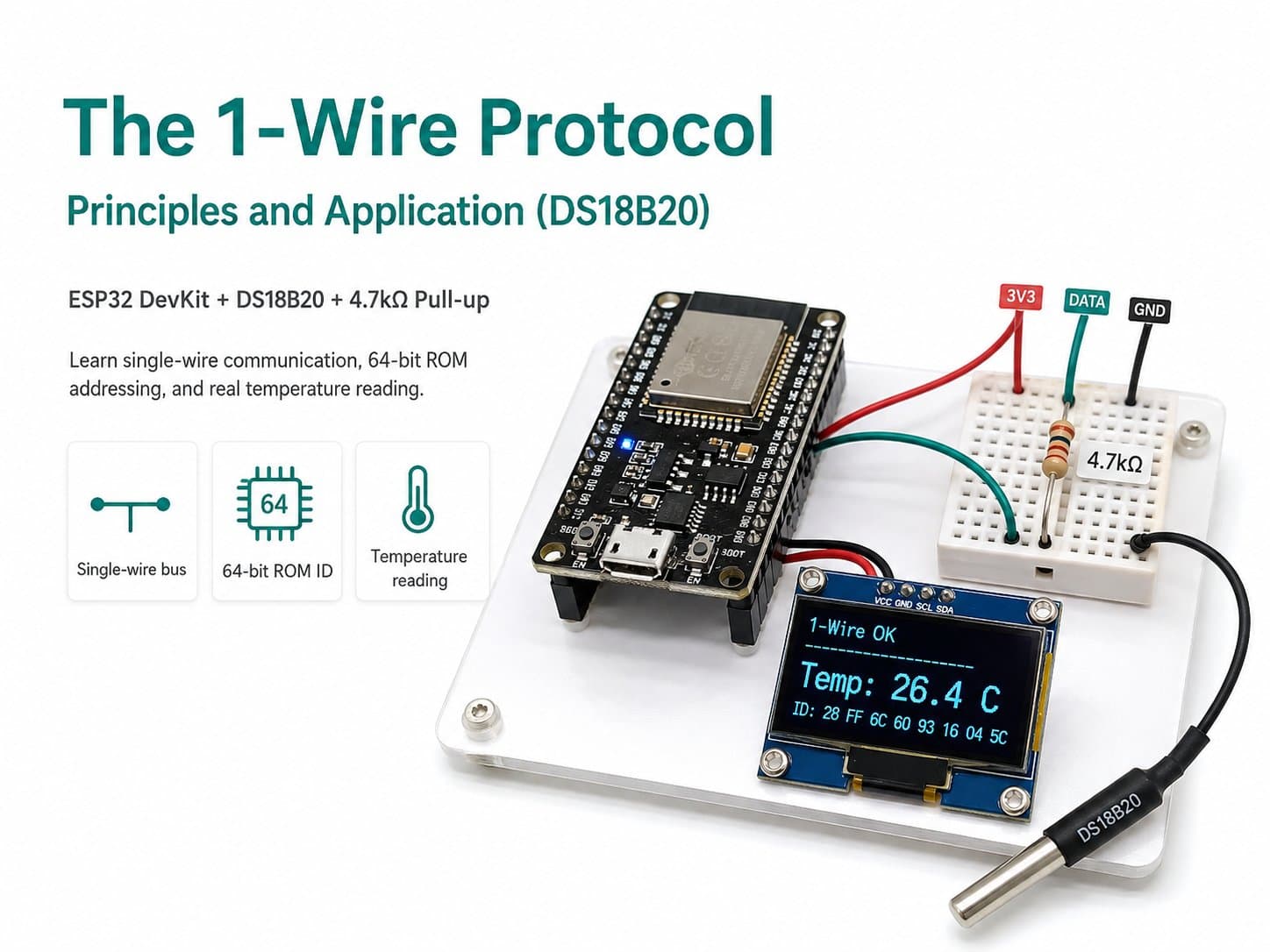
The 1-Wire Protocol: Principles and Application (DS18B20)
The 1-Wire protocol explained (a single-wire open-drain bus, 64-bit ROM addressing), with hands-on DS18B20 temperature reading on an ESP32 DevKit and a 4.7kΩ pull-up resistor.
1-Wire is a serial communication protocol developed by Dallas Semiconductor (now part of Maxim/Analog Devices), notable for using only a single DATA signal wire for both sending and receiving (plus GND, and optionally VCC if not using "parasite power" drawn from the DATA line itself).
It's an open-drain bus, so a pull-up resistor (typically 4.7kΩ) between DATA and the supply rail is mandatory. The most distinctive feature: every 1-Wire chip (like the DS18B20) ships with a unique 64-bit ROM address burned in at the factory, letting many sensors share a single DATA wire while each remains individually addressable — unlike I2C, where addresses must be configured in hardware/software and are limited to 7 bits (max 128 values).
This lesson reads temperature from a DS18B20 sensor via GPIO4 on an ESP32 DevKit.
Detailed guide
1-Wire principles (a single-wire open-drain bus, 64-bit ROM addressing), with hands-on DS18B20 temperature reading on an ESP32 DevKit.
1. Introduction
1-Wire is a half-duplex serial protocol developed by Dallas Semiconductor, distinguished by using only a single DATA wire for both sending commands from the master and receiving data from the slave (plus GND for a common ground). Like I2C, it's an open-drain bus, so a pull-up resistor (typically 4.7kΩ) between DATA and the supply rail is mandatory — without it, the bus always reads low and no communication can happen.
The key difference from I2C: every 1-Wire chip ships with a globally unique 64-bit ROM address burned in at the factory (8-bit family code + 48-bit serial number + 8-bit CRC), needing no configuration like a 7-bit I2C address. This lets you wire dozens of DS18B20 sensors onto a single shared DATA line while still reading each one individually by its ROM address, with no address-collision worries like with I2C. This lesson reads temperature from a single DS18B20 sensor via GPIO4 on an ESP32 DevKit.
2. Components Needed
| Component | Qty | Note |
|---|---|---|
| ESP32 DevKit V4 | 1 | Main board |
| DS18B20 (1-Wire temperature sensor) | 1 | Range -55°C to 125°C, accuracy ±0.5°C |
| 4.7kΩ Resistor | 1 | Mandatory pull-up for the DATA line (an open-drain bus) |
| Jumper wires | 3 | VCC, GND, DATA |
3. Wiring Diagram
| DS18B20 | ESP32 |
|---|---|
| VCC (red) | 3V3 |
| GND (black) | GND |
| DATA (yellow) | GPIO4 |
A 4.7kΩ resistor connects between the DATA pin (GPIO4) and 3V3 — this pull-up is mandatory, not optional: without it, the DATA line stays low (because it's open-drain) and sensors.getDeviceCount() will always return 0.
4. Example #1 — Reading Temperature, Printing the ROM Address
A sketch using the OneWire + DallasTemperature libraries, detecting the number of devices on the bus with sensors.getDeviceCount(), printing the first sensor's 64-bit ROM address, setting 12-bit resolution, then reading the temperature every 2 seconds.
/*
  The 1-Wire Protocol: Principles and Application — Example #1: Reading DS18B20 Temperature
  Board: ESP32 DevKit V4 + DS18B20 (1-Wire) + 4.7kΩ pull-up resistor

  Wiring:
    DS18B20 VCC  -> 3V3
    DS18B20 GND  -> GND
    DS18B20 DATA -> GPIO4  (also connected via a 4.7kΩ resistor up to 3V3 - a
                             mandatory pull-up since 1-Wire is an open-drain bus)

  1-Wire lets multiple DS18B20 sensors share a single DATA wire, distinguished
  by each chip's unique, factory-burned 64-bit ROM address (unlike I2C, which
  uses a 7-bit address configured in hardware/software).
*/

#include <OneWire.h>
#include <DallasTemperature.h>

#define ONE_WIRE_PIN 4

OneWire oneWire(ONE_WIRE_PIN);
DallasTemperature sensors(&oneWire);

DeviceAddress sensorAddress;
bool sensorFound = false;

void printAddress(DeviceAddress addr) {
  for (uint8_t i = 0; i < 8; i++) {
    if (addr[i] < 16) Serial.print('0');
    Serial.print(addr[i], HEX);
  }
}

void setup() {
  Serial.begin(115200);
  delay(300);
  Serial.println(F("=== DS18B20 1-Wire demo boot ==="));

  sensors.begin();
  uint8_t count = sensors.getDeviceCount();
  Serial.printf("So thiet bi 1-Wire tim thay tren bus: %u\n", count);

  if (count > 0 && sensors.getAddress(sensorAddress, 0)) {
    sensorFound = true;
    Serial.print(F("Dia chi ROM 64-bit cua cam bien #0: "));
    printAddress(sensorAddress);
    Serial.println();
    sensors.setResolution(sensorAddress, 12); // do phan giai 12-bit (~750ms/lan doc)
  } else {
    Serial.println(F("[WARN] Khong tim thay DS18B20 - kiem tra pull-up 4.7k va day DATA"));
  }
}

void loop() {
  static unsigned long lastRead = 0;
  if (millis() - lastRead >= 2000) {
    lastRead = millis();

    sensors.requestTemperatures(); // gui lenh convert T tren bus 1-Wire

    if (sensorFound) {
      float tempC = sensors.getTempC(sensorAddress);
      if (tempC == DEVICE_DISCONNECTED_C) {
        Serial.println(F("[WARN] Cam bien mat ket noi giua chung"));
      } else {
        Serial.printf("Nhiet do: %.2f C (do phan giai 12-bit)\n", tempC);
      }
    } else {
      Serial.println(F("Khong co cam bien de doc"));
    }
  }
}
5. Example #2 — The Real Application: a Temperature Threshold Alert
A second variant that uses the onboard LED on GPIO2 to trigger an alert when temperature crosses a 30°C threshold — simulating a real temperature-monitoring application (an electrical cabinet, a server, an aquaculture tank).
/*
  The 1-Wire Protocol — Example #2: The Real Application — a Temperature Threshold Alert
  Board: ESP32 DevKit V4 + DS18B20 (DATA=GPIO4, 4.7kΩ pull-up to 3V3)
  Simulated application: turns on the onboard LED (GPIO2) when temperature exceeds a threshold.
*/

#include <OneWire.h>
#include <DallasTemperature.h>

#define ONE_WIRE_PIN 4
#define ALERT_LED_PIN 2
#define TEMP_THRESHOLD_C 30.0F

OneWire oneWire(ONE_WIRE_PIN);
DallasTemperature sensors(&oneWire);

void setup() {
  Serial.begin(115200);
  delay(300);
  Serial.println(F("=== DS18B20 canh bao nguong nhiet do ==="));

  pinMode(ALERT_LED_PIN, OUTPUT);
  digitalWrite(ALERT_LED_PIN, LOW);

  sensors.begin();
  Serial.printf("Nguong canh bao: %.1f C\n", TEMP_THRESHOLD_C);
}

void loop() {
  sensors.requestTemperatures();
  float tempC = sensors.getTempCByIndex(0);

  if (tempC == DEVICE_DISCONNECTED_C) {
    Serial.println(F("[WARN] Khong doc duoc cam bien - kiem tra day 1-Wire"));
    digitalWrite(ALERT_LED_PIN, LOW);
  } else {
    bool alert = tempC >= TEMP_THRESHOLD_C;
    digitalWrite(ALERT_LED_PIN, alert ? HIGH : LOW);
    Serial.printf("Nhiet do: %.2f C -> LED canh bao: %s\n", tempC, alert ? "BAT" : "TAT");
  }

  delay(2000);
}
6. Real Applications & Extensions
1-Wire's built-in 64-bit ROM addressing (needing no configuration) makes it well suited for multi-point temperature-monitoring systems: a long cable run through several rooms/electrical cabinets, with a DS18B20 at each point — all sharing a single DATA wire back to the central board, with no address-collision concerns.
Common applications: multi-point cold-storage temperature monitoring, floor heating systems, battery/electrical-cabinet temperature monitoring. The DS18B20 also supports "parasite power" (drawing power directly from the DATA line, eliminating the VCC wire entirely) — useful for very long cable runs and minimizing wire count, though this configuration requires a stronger pull-up MOSFET in the code.
7. Common Issues
| Issue | Cause | Fix |
|---|---|---|
getDeviceCount() always returns 0 | Missing the 4.7kΩ pull-up resistor on the DATA line | Add a 4.7kΩ resistor between DATA and 3V3 |
Reading -127.00 or 85.00 | -127 means the sensor is disconnected; 85 is the default reset value from reading too soon after the convert command | Recheck the DATA wiring; wait long enough for conversion (~750ms at 12-bit) before reading |
| The temperature reading is way off from reality | Resolution set below 12-bit, or the sensor is picking up thermal noise from nearby components | Call setResolution(addr, 12); place the sensor away from heat sources (the ESP32, the power supply) |
| Multiple sensors on the same wire report the same value | The code only reads index 0 instead of looping through each ROM address | Use sensors.getAddress() to fetch each sensor's correct ROM address when there are multiple devices |
8. Summary
1-Wire is the most wire-efficient of the three protocols (just a single DATA wire), thanks to its built-in 64-bit ROM addressing from the factory, needing no address configuration like I2C.
The trade-off is lower speed and a more intricate low-level protocol (precise microsecond timing), but libraries like OneWire/DallasTemperature hide all that complexity. This is the classic choice for distributed temperature sensing, long cable runs, and many measurement points.