A very common struggle for many makers is this: after successfully prototyping on a breadboard — code runs fine, the sensor reads data, and the board works correctly — the project often stalls at the "desk demo" stage.
When you want to turn it into a complete prototype to showcase, test in the real world, or share with others, new problems appear: will the device run reliably for hours or days? Is sensor data being sent consistently? Is the device online or has it lost connection? When something goes wrong, how do you tell whether the fault is in the hardware, the WiFi, the firmware, or the server?
This is the large gap between a working IoT test circuit and a genuinely usable IoT device. Beyond the board and the code, a maker also needs a simple way to monitor device status, view real-time data, keep a history of activity, check for errors, and evaluate a prototype's reliability.
However, getting into cloud technology, MQTT, real-time dashboards, alerts, and remote device management isn't easy for a newcomer. That's exactly why IoTSpark was built — to help makers move their IoT projects step by step from a rough prototype to a complete one that can be monitored, evaluated, and improved in real-world conditions.
That is exactly why IoTSpark was created.
IoTSpark is a hands-on IoT learning platform for makers worldwide, focused on popular technologies like ESP32, Raspberry Pi, Arduino, sensors, electronic circuits, MQTT, IoT Cloud, and real-world application projects. Rather than dry theory alone, IoTSpark guides learners toward understanding the principles, wiring things up by hand, programming, testing, and deploying complete IoT products.
Why Was IoTSpark Built?
Many people starting out in IoT run into the same problem: there's plenty of material, but it's scattered; tutorial videos exist but are hard to follow as a coherent path; sample code runs once, but breaks easily when you try to modify it; and datasheets, pinouts, resistors, sensors, power supplies, MQTT, and the cloud are all areas that tend to cause confusion.
IoTSpark was built to solve exactly these problems.
The platform doesn't just offer tutorial articles — it helps learners follow a clearer path:
Learn basic electronics.
Understand how components and sensors work.
Learn to read datasheets, pinouts, and technical specs.
Practice with ESP32, Arduino, and Raspberry Pi.
Send sensor data to the Cloud over MQTT.
Build dashboards, alerts, and device control.
Develop IoT projects relevant to everyday life.
IoTSpark's goal is to turn learning IoT into a practical, accessible journey that anyone can apply right away, helping raise the technical skill level of the community.
Who Is IoTSpark For?
IoTSpark suits many different kinds of learners.
If you're a complete beginner, the platform will help you understand foundational concepts like voltage, current, resistance, LEDs, diodes, breadboards, sensors, and how to wire a circuit safely.
If you're a student in electronics, automation, computer science, or mechatronics, IoTSpark can serve as a practical reference for coursework, class projects, or a graduation thesis.
If you're a maker, technician, or DIY enthusiast, you'll find plenty of relatable project ideas: a flood alert, temperature/humidity monitoring, relay control, remote device monitoring, an automatic plant-watering system, a mini smart home, or other IoT models for the home.
If you're a teacher or STEM educator, the lessons and projects on IoTSpark can be used to design hands-on activities, helping students understand technology through real hardware rather than theory alone.
Learning IoT by Building Real Projects
A key difference for IoTSpark is its focus on project-based learning.
An IoT lesson shouldn't stop at "wire it up and print data to the Serial Monitor." Learners need to understand why a particular sensor is used, what the collected data actually means, when an alert is needed, when data should go to the cloud, and how to turn a test circuit into something genuinely useful.
For example, with a temperature/humidity sensor, you might start by reading data locally on the Serial Monitor. Then you upgrade the project by sending the data to an MQTT Cloud, displaying it on a dashboard, setting alert thresholds, and getting notified when the temperature exceeds a safe level.
From one small lesson, a learner can grow it into a real application, such as:
Monitoring a classroom's temperature.
Tracking greenhouse humidity.
Alerting on cold-storage temperature.
Monitoring a bedroom's environment.
Automatically turning on a fan or pump based on sensor conditions.
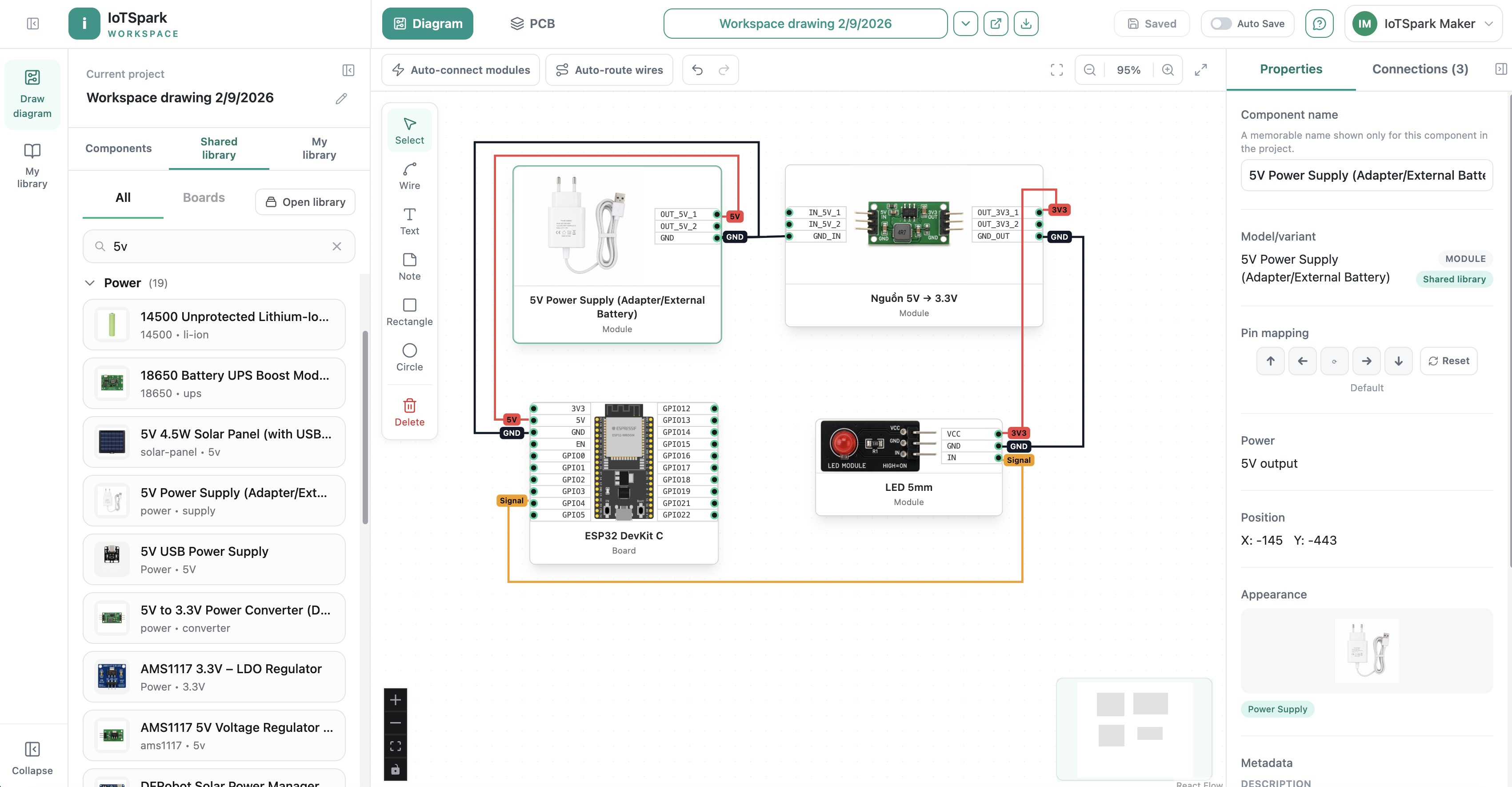
This is the spirit of IoTSpark: learn from a small component, build it into a real system, with a Diagram → Code → Build → Flash → Monitor workflow all in one Workspace: https://iotspark.io/workspace
What You'll Find on IoTSpark
IoTSpark focuses on content that's practical, easy to apply, and highly extensible.
1. Basic Electronics for Beginners
This is the essential foundation before diving deep into IoT. Learners get familiar with concepts like voltage, current, power, resistors, capacitors, diodes, LEDs, breadboards, jumper wires, power supplies, and how to read a component datasheet.
This knowledge helps learners avoid common mistakes like reversing polarity, choosing the wrong current-limiting resistor, feeding the wrong voltage to a sensor, or using the wrong GPIO pin on an ESP32 board.
2. ESP32, Arduino, and Raspberry Pi
IoTSpark offers hands-on lessons with today's most popular hardware platforms.
With ESP32, learners can build WiFi/Bluetooth-enabled IoT devices, read sensors, control relays, send MQTT data, do OTA firmware updates, and connect to the cloud.
With Arduino, learners can start from the basics — LEDs, push buttons, analog sensors, motors, servos, and simple control circuits.
With Raspberry Pi, learners can move on to more capable applications like a mini server, an IoT gateway, data processing, cameras, local dashboards, and small automation systems.
3. Common Sensors and Modules
An IoT system usually starts with a sensor. That's why IoTSpark covers how to use many common sensors, such as:
Temperature and humidity sensors.
Gas and smoke sensors.
Light sensors.
Motion sensors.
Water-level sensors.
Distance sensors.
Current and voltage sensors.
Relay, buzzer, OLED, TFT, push-button modules, and other interface modules.
Each lesson doesn't just explain the wiring and code — it also covers real-world applications, common pitfalls, and how to extend it into a complete project.
Real Projects You Can Learn and Build
IoTSpark focuses on relatable projects you can apply at home, in a classroom, on a farm, in a shop, in a small workshop, or in a personal lab.
Some representative ideas include:
An IoT weather station for a farm.
A kitchen gas-leak alarm.
A basement flood alert system.
An automatic watering kit for a balcony or small garden.
A cold-storage temperature monitor.
An unauthorized door-opening alert system.
A bedroom air-quality meter.
Camera streaming with the ESP32-S3.
A sensor-monitoring dashboard over MQTT.
Remote relay control via a web or mobile app.
These projects help learners see clearly that IoT isn't something distant. It can start from a very everyday problem: a thirsty plant, an overheated room, a cold-storage unit losing temperature, a door left open, flooding water, a gas leak, or a device that needs remote control.
Learn to Understand, Build to Remember, Apply to Grow
IoTSpark isn't about learning by mechanically copying code. Instead, every lesson tries to help readers answer key questions:
What is this component used for?
What's the basic operating principle?
How should it be wired correctly?
Which specs in the datasheet matter?
How does the code work?
What are the common pitfalls?
What real project could this grow into?
When should data go to the cloud?
How can the product be made more reliable?
Once you understand these things, you're not just following a tutorial — you gain the ability to design, debug, and build your own projects.
IoTSpark and the Global Maker Spirit
The maker community is a place where people who love creativity, technology, and experimentation learn together. Someone might start by blinking an LED, then move on to reading sensors, controlling motors, designing circuits, 3D-printing an enclosure, and eventually building a complete IoT product.
IoTSpark aims to become a familiar destination for makers everywhere — a place where anyone can find easy-to-understand knowledge, real projects, detailed guides, and the inspiration to get started.
Whether you're a beginner, a student, a teacher, an engineer, or a DIY enthusiast, you can start from small lessons and gradually build up bigger skills.
IoTSpark is still being developed and refined, so the platform will inevitably have gaps in the user experience, tutorial content, features, or system stability.
The IoTLabs Team warmly welcomes feedback from makers and anyone who loves IoT, ESP32, Raspberry Pi, Arduino, and hands-on technology projects. Every piece of feedback, comment, or improvement suggestion is an important source of motivation that helps our team improve the platform's quality every day.
IoTSpark's goal is to become a better, more stable, and genuinely useful learning and practice platform for makers everywhere.
Start Your IoT Journey with IoTSpark
If you've ever wanted to build your own smart device but didn't know where to start, IoTSpark is the right place to begin.
Start with an ESP32 board, a simple sensor, a few jumper wires, and a hands-on tutorial. From there, you can gradually build IoT systems for everyday life, learning, research, or a future commercial product.
IoTSpark – Research, Create, Experiment.
Discover more at: https://iotspark.io