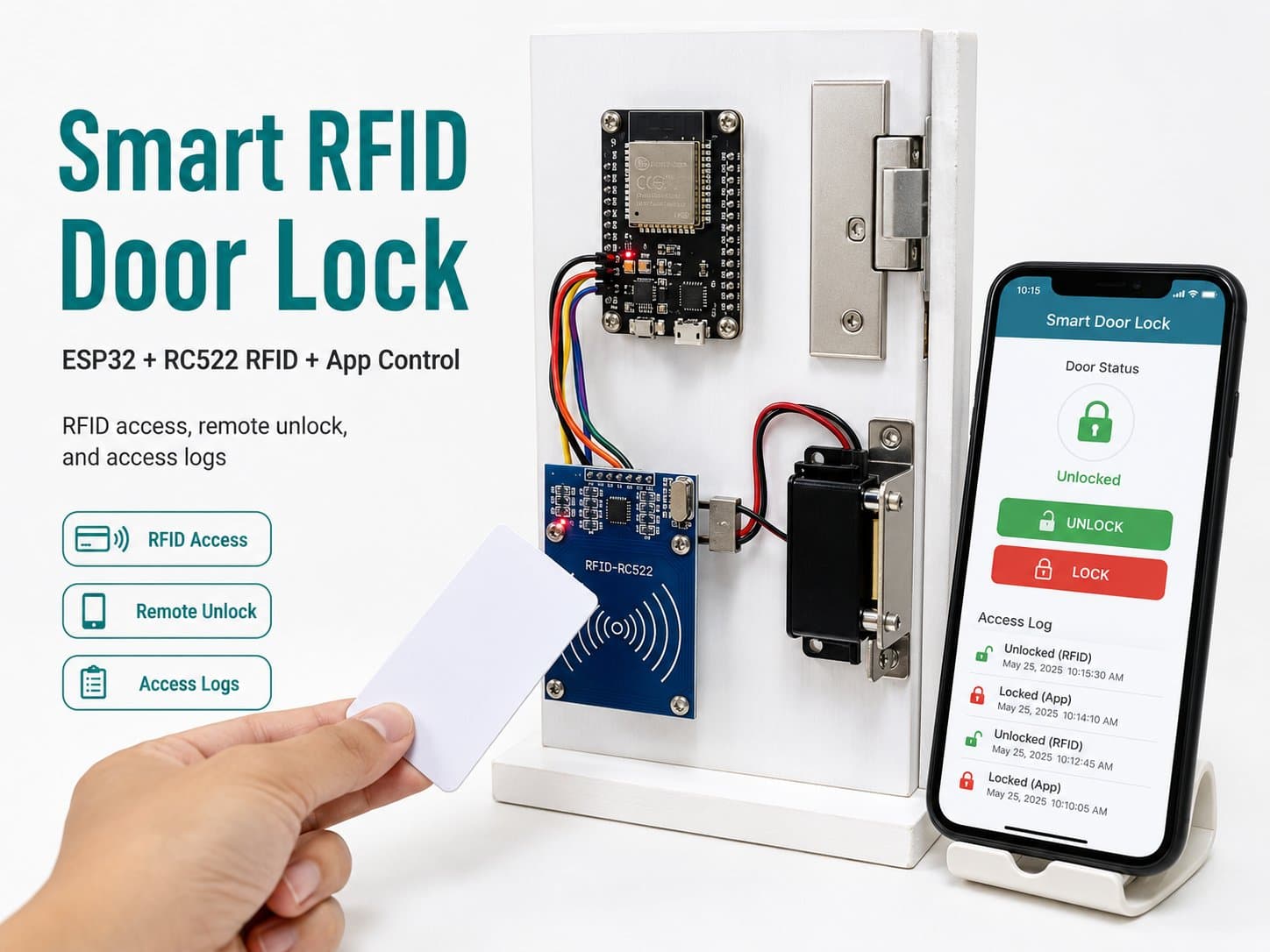
Smart RFID Door Lock + App Control
An ESP32 with an RC522 RFID reader unlocks the door with a valid card, while also hosting a local HTTP API for remote unlocking from an app — both paths share the same lock logic and auto-relock after a few seconds.
This RFID door lock supports two ways to unlock: tapping a valid RFID card on the RC522 reader in person, or sending an unlock command remotely through a local HTTP API hosted right on the ESP32 — simulating an "app control" flow.
Detailed guide
An ESP32 with an RC522 RFID reader unlocks the door with a valid card, while also hosting a local HTTP API for remote unlocking from an app.
1. Introduction
This RFID door lock combines two unlock methods: (1) tapping a valid RFID card/tag on the RC522 reader in person, and (2) sending an unlock command remotely through a local HTTP API hosted right on the ESP32 (simulating an "app control" flow).
Once authentication succeeds (a valid card UID or the correct app token), the ESP32 triggers a relay that powers the electric lock for a configured duration and then automatically re-locks — no need for the user to remember to lock it manually.
2. Components Needed
Component | Qty | Notes |
|---|---|---|
ESP32 DevKit V4 | 1 | The main board, handling RFID (SPI) + WiFi + WebServer |
RFID RC522 Reader/Writer (mod_rc522_rfid) | 1 | Reads 13.56MHz card/tag UIDs over SPI, powered at 3.3V only |
Relay Module 1 kênh 5V (mod_relay_1ch) | 1 | Closes the power circuit to the electric lock on successful authentication |
Van điện từ Solenoid 12V (mod_solenoid_valve) | 1 | Substitutes for a real 12V electric door lock — the catalog doesn't yet have a dedicated "electric door lock" entry; since it shares the same electrical characteristics (a 12V DC coil), it's used here to illustrate the solenoid load |
Diode chỉnh lưu 1N4007 (comp_diode_1n4007) | 1 | A flyback diode wired in reverse parallel across the lock/solenoid coil to protect the relay |
3. Wiring Diagram
Module pin | ESP32 |
|---|---|
RC522 VCC | 3V3 (3.3V ONLY — do not use 5V) |
RC522 GND | GND |
RC522 RST | GPIO27 |
RC522 SDA/SS | GPIO5 |
RC522 MOSI | GPIO23 |
RC522 MISO | GPIO19 |
RC522 SCK | GPIO18 |
Relay VCC | 5V |
Relay GND | GND |
Relay IN | GPIO26 |
Relay NO/COM | +12V external supply → Solenoid VCC (the electric lock) |
Diode 1N4007 CATHODE | Solenoid VCC (+12V) |
Diode 1N4007 ANODE | Solenoid GND |
Important note: the RC522 only tolerates 3.3V on VCC — accidentally feeding it 5V will destroy the module. The 1N4007 diode is wired in reverse parallel across the lock/solenoid coil (cathode toward the positive supply) to absorb the back-EMF spike generated when the relay cuts power to an inductive load, protecting the relay's contacts from arcing.
4. Example #1 — Reading an RFID Card's UID via RC522 (SPI)
This snippet shows the function that converts a UID to a hex string, and the card-reading loop:
String uidToString(MFRC522::Uid uid) {
  String s = "";
  for (byte i = 0; i < uid.size; i++) {
    if (uid.uidByte[i] < 0x10) s += "0";
    s += String(uid.uidByte[i], HEX);
    if (i + 1 < uid.size) s += " ";
  }
  s.toUpperCase();
  return s;
}

// Trong loop():
if (rfid.PICC_IsNewCardPresent() && rfid.PICC_ReadCardSerial()) {
  String uid = uidToString(rfid.uid);
  Serial.println(uid); // vd "DE AD BE EF"
  rfid.PICC_HaltA();
  rfid.PCD_StopCrypto1();
}
5. Example #2 — Unlocking via an App Command (HTTP WebServer)
This snippet shows the /unlock route — the app sends a POST with the correct X-Api-Token header to unlock remotely:
void handleUnlock() {
  String token = server.header("X-Api-Token");
  if (token != APP_API_TOKEN) {
    server.send(401, "application/json", "{\"error\":\"invalid token\"}");
    return;
  }
  setLock(true, "app request");
  server.send(200, "application/json", "{\"status\":\"unlocked\"}");
}

// setup(): server.on("/unlock", HTTP_POST, handleUnlock);
//          server.on("/status", HTTP_GET, handleStatus);
6. Example #3 — The Complete Application: RFID + Relay + WebServer App Control
The full firmware: boots up, checks that the RC522's version register can be read at boot (degrading to logging "rfid=null" if it can't), reconnects WiFi with a timeout, and auto-relocks after 4 seconds:
/*
  Khóa cửa thông minh RFID + điều khiển qua app
  Board: ESP32 DevKit V4 (board_esp32_devkitc)
  - RFID RC522 (mod_rc522_rfid, SPI, VCC 3.3V CHỈ):
      RST  -> GPIO27
      SDA/SS -> GPIO5
      MOSI -> GPIO23
      MISO -> GPIO19
      SCK  -> GPIO18
      VCC  -> 3V3, GND -> GND
  - Relay 1 kênh (mod_relay_1ch) IN -> GPIO26, VCC -> 5V, GND -> GND
      NO/COM đóng mạch cấp nguồn 12V cho khóa điện từ / van solenoid (mod_solenoid_valve,
      dùng thay thế khóa điện từ 12V thật vì catalog hiện chưa có "khóa cửa điện từ" riêng
      - cùng đặc tính điện: cuộn dây DC 12V, cần diode chống dội flyback).
  - Diode 1N4007 (comp_diode_1n4007) mắc song song ngược cực với cuộn dây khóa để bảo vệ relay
    khỏi điện áp cảm ứng ngược khi ngắt tải.

  Tính năng "điều khiển qua app": ESP32 mở một WebServer HTTP nội bộ (cùng mạng LAN) nhận
  lệnh mở khóa từ xa (POST /unlock), ngoài luồng quét thẻ RFID tại chỗ.
*/

#include <WiFi.h>
#include <WebServer.h>
#include <SPI.h>
#include <MFRC522.h>

// ==== Cấu hình người dùng ====
const char *WIFI_SSID = "YOUR_WIFI_SSID";
const char *WIFI_PASSWORD = "YOUR_WIFI_PASSWORD";
const char *APP_API_TOKEN = "YOUR_SHARED_SECRET_TOKEN"; // app phải gửi kèm token này

// ==== Chân kết nối ====
const int PIN_RC522_RST = 27;
const int PIN_RC522_SS = 5;
const int PIN_RELAY_IN = 26;

const unsigned long UNLOCK_DURATION_MS = 4000; // giữ khóa mở 4s rồi tự khóa lại
const unsigned long WIFI_RETRY_INTERVAL_MS = 5000;
const unsigned long WIFI_CONNECT_TIMEOUT_MS = 10000;
const unsigned long TELEMETRY_INTERVAL_MS = 5000;

// Danh sách UID thẻ được phép (thay bằng UID thật khi triển khai)
const char *ALLOWED_UIDS[] = {"DE AD BE EF", "12 34 56 78"};
const size_t ALLOWED_UIDS_COUNT = sizeof(ALLOWED_UIDS) / sizeof(ALLOWED_UIDS[0]);

MFRC522 rfid(PIN_RC522_SS, PIN_RC522_RST);
WebServer server(80);

unsigned long lastWifiAttemptMs = 0;
unsigned long lastTelemetryMs = 0;
unsigned long unlockUntilMs = 0;
bool locked = true;
bool rfidReady = false;

void setLock(bool unlock, const char *reason) {
  digitalWrite(PIN_RELAY_IN, unlock ? LOW : HIGH); // active-low relay
  locked = !unlock;
  if (unlock) {
    unlockUntilMs = millis() + UNLOCK_DURATION_MS;
  }
  Serial.printf("[Lock] %s (ly do: %s)\n", unlock ? "MO KHOA" : "KHOA LAI", reason);
}

String uidToString(MFRC522::Uid uid) {
  String s = "";
  for (byte i = 0; i < uid.size; i++) {
    if (uid.uidByte[i] < 0x10) s += "0";
    s += String(uid.uidByte[i], HEX);
    if (i + 1 < uid.size) s += " ";
  }
  s.toUpperCase();
  return s;
}

bool isAllowedUid(const String &uid) {
  for (size_t i = 0; i < ALLOWED_UIDS_COUNT; i++) {
    if (uid.equalsIgnoreCase(ALLOWED_UIDS[i])) return true;
  }
  return false;
}

void handleUnlock() {
  String token = server.header("X-Api-Token");
  if (token != APP_API_TOKEN) {
    server.send(401, "application/json", "{\"error\":\"invalid token\"}");
    return;
  }
  setLock(true, "app request");
  server.send(200, "application/json", "{\"status\":\"unlocked\"}");
}

void handleStatus() {
  String json = String("{\"locked\":") + (locked ? "true" : "false") +
                ",\"rfidReady\":" + (rfidReady ? "true" : "false") + "}";
  server.send(200, "application/json", json);
}

void connectWiFiNonBlocking() {
  if (WiFi.status() == WL_CONNECTED) return;
  unsigned long now = millis();
  if (now - lastWifiAttemptMs < WIFI_RETRY_INTERVAL_MS) return;
  lastWifiAttemptMs = now;

  Serial.printf("[WiFi] Dang ket noi toi SSID \"%s\" ...\n", WIFI_SSID);
  WiFi.mode(WIFI_STA);
  WiFi.begin(WIFI_SSID, WIFI_PASSWORD);

  unsigned long start = millis();
  while (WiFi.status() != WL_CONNECTED && millis() - start < WIFI_CONNECT_TIMEOUT_MS) {
    delay(200);
    Serial.print(".");
  }
  Serial.println();

  if (WiFi.status() == WL_CONNECTED) {
    Serial.printf("[WiFi] Da ket noi. IP: %s\n", WiFi.localIP().toString().c_str());
    server.begin();
    Serial.println("[HTTP] WebServer san sang: POST /unlock, GET /status");
  } else {
    Serial.println("[WiFi] Ket noi that bai, se thu lai sau.");
  }
}

void setup() {
  Serial.begin(115200);
  delay(300);
  Serial.println();
  Serial.println("========================================");
  Serial.println(" IoTLabs Maker - Khoa Cua RFID + App");
  Serial.println(" Board: ESP32 DevKit V4");
  Serial.println("========================================");

  pinMode(PIN_RELAY_IN, OUTPUT);
  setLock(false, "khoi dong");

  SPI.begin(); // SCK=GPIO18, MISO=GPIO19, MOSI=GPIO23 (mac dinh VSPI tren ESP32 DevKit)
  rfid.PCD_Init();
  byte version = rfid.PCD_ReadRegister(MFRC522::VersionReg);
  rfidReady = (version != 0x00 && version != 0xFF);
  if (rfidReady) {
    Serial.printf("[RC522] Khoi tao OK (version reg=0x%02X)\n", version);
  } else {
    Serial.println("[RC522] KHONG doc duoc module - kiem tra day noi SPI/nguon 3.3V.");
  }

  server.on("/unlock", HTTP_POST, handleUnlock);
  server.on("/status", HTTP_GET, handleStatus);

  connectWiFiNonBlocking();
}

void loop() {
  connectWiFiNonBlocking();
  if (WiFi.status() == WL_CONNECTED) {
    server.handleClient();
  }

  if (!locked && millis() > unlockUntilMs) {
    setLock(false, "het thoi gian giu khoa");
  }

  if (rfidReady && rfid.PICC_IsNewCardPresent() && rfid.PICC_ReadCardSerial()) {
    String uid = uidToString(rfid.uid);
    bool allowed = isAllowedUid(uid);
    Serial.printf("[RFID] The quet UID=%s -> %s\n", uid.c_str(), allowed ? "HOP LE" : "TU CHOI");
    if (allowed) {
      setLock(true, "the RFID hop le");
    }
    rfid.PICC_HaltA();
    rfid.PCD_StopCrypto1();
  }

  unsigned long now = millis();
  if (now - lastTelemetryMs >= TELEMETRY_INTERVAL_MS) {
    lastTelemetryMs = now;
    Serial.printf("[Telemetry] locked=%s rfid=%s wifi=%s\n",
                  locked ? "true" : "false",
                  rfidReady ? "ready" : "null",
                  WiFi.status() == WL_CONNECTED ? "connected" : "disconnected");
  }

  delay(50);
}
7. Common Issues
Issue | Cause | Fix |
|---|---|---|
Serial prints "RC522 KHONG doc duoc module" (module unreadable) | Wrong SPI wiring, or 5V was mistakenly fed into VCC, damaging the module | Double-check the 4 SPI wires (MOSI/MISO/SCK/SS) are on the right pins, and measure VCC to confirm it's exactly 3.3V |
Tapping a valid card doesn't unlock the door | The card's actual UID isn't in the ALLOWED_UIDS array, or the RC522 is hanging due to SPI noise from overly long wires | Print the UID to Serial when tapping to capture the real UID, then update the array; keep SPI wires under 20cm |
The app's call to /unlock returns 401 | The token sent by the app doesn't match the APP_API_TOKEN configured on the ESP32 | Sync the token value between the app and the firmware; avoid hard-coding a real token in publicly shared sample code |
The relay randomly clicks repeatedly even without a card being tapped | Missing flyback diode across the solenoid coil, causing back-EMF noise that disrupts the control circuit | Install the 1N4007 diode correctly in reverse parallel across the coil, as shown in section 3's diagram |
Safety Notes
A door-lock control circuit falls into a critical safety category: a relay switching an inductive load (a solenoid) must have a flyback diode to prevent back-EMF spikes from damaging the relay or disturbing the MCU.
For a real door lock, always add a mechanical backup unlock mechanism (a physical key) to avoid being locked out during a power failure or firmware bug — this is a mandatory safety recommendation for any real electronic lock installation.
8. Summary
This project demonstrates two parallel authentication paths for an IoT door lock: in-person RFID and a remote app API, both sharing one central setLock() function to avoid conflicting states.
Possible extensions: store allowed UIDs on a server instead of hard-coding them, log the unlock history, or add two-factor authentication (RFID + PIN) for more sensitive areas.