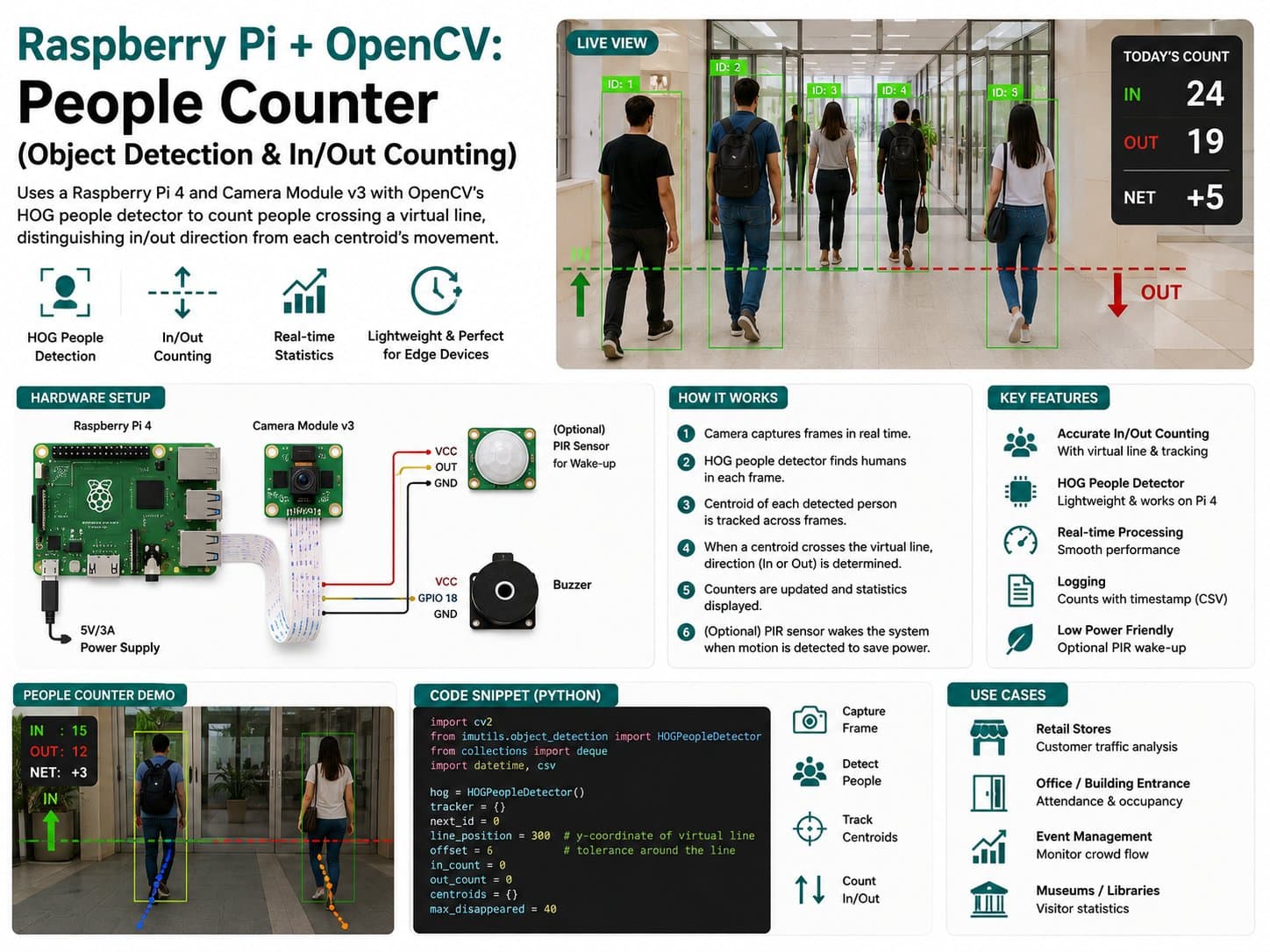
Raspberry Pi + OpenCV: People Counter (Object Detection & In/Out Counting)
Uses a Raspberry Pi 4 and Camera Module v3 with OpenCV's HOG people detector to count people crossing a virtual line, distinguishing in/out direction from each centroid's movement.
This project builds a people-counting system that runs entirely on a Raspberry Pi 4, with the Camera Module v3 as the eye and OpenCV as the image-processing brain.
Instead of needing an infrared sensor or a dedicated counting circuit, all you need is a camera looking down a walkway: OpenCV's HOG (Histogram of Oriented Gradients) people detector spots human shapes in each frame, a simple centroid tracker assigns an ID to each person and follows their position across consecutive frames, and that position is compared against a horizontal virtual line to decide whether the person is going in or out.
Detailed guide
Build a real-time people in/out counter on a Raspberry Pi 4 with a Camera Module v3, using OpenCV's HOG People Detector and a centroid tracker, with every crossing event logged to CSV.
1. Introduction
This project builds a people counting system (people in/out counter) running entirely on a Raspberry Pi 4, using a Camera Module v3 as the eye and OpenCV as the image-processing brain. Instead of needing an infrared sensor or a dedicated counting circuit, all you need is a camera looking down a walkway: OpenCV's HOG (Histogram of Oriented Gradients) People Detector finds each person's shape in every frame, a simple centroid tracker (CentroidTracker) assigns an ID to each person and follows their position across consecutive frames, then compares that position to a horizontal virtual line to decide whether the person is entering or exiting.
The whole pipeline runs in pure Python on Raspberry Pi OS, with no model training required — the HOG People Detector ships built into OpenCV, and is good enough for small-scale foot-traffic counting (a shop, classroom, or lab). Since this is a classical detector (not a modern deep-learning one like YOLO), accuracy drops when multiple people occlude each other or lighting is poor — the "Common Issues" section at the end covers these limitations in detail.
2. Components Needed
| Component | Qty | Reference Price |
|---|---|---|
| Raspberry Pi 4 Model B (2/4/8GB RAM) | 1 | ~1,500,000 – 2,200,000₫ |
| Raspberry Pi Camera Module v3 (IMX708) | 1 | ~700,000 – 900,000₫ |
| 32GB microSD Card (Class 10 or higher, with Raspberry Pi OS installed) — accessory, not part of the wiring diagram | 1 | ~150,000₫ |
| USB-C 5V/3A Power Supply — accessory, not part of the wiring diagram | 1 | ~150,000₫ |
3. Wiring Diagram
| RPi Camera Module v3 | Raspberry Pi 4 |
|---|---|
| CSI (Ribbon connector) | CSI Camera Port |
| SDA (I2C control) | GPIO2 / SDA1 (Pin 3) |
| SCL (I2C control) | GPIO3 / SCL1 (Pin 5) |
| 3V3 (Power) | 3V3 (Pin 1/17) |
| GND | GND |
The main connection is the 15-pin CSI ribbon cable that comes with the camera — plug it directly into the CSI port on the Raspberry Pi 4 (located between the HDMI port and the audio jack).
Note the cable orientation: the side with the metal contacts (copper traces) must face the HDMI port (opposite the USB ports); inserting it backwards is the most common cause of a "no cameras available" error. Remember to release the plastic latch on the CSI connector before inserting the cable, feed it in, then press the latch firmly closed.
The four SDA/SCL/3V3/GND wires only apply to boards that route the Camera Module v3's autofocus I2C control pins out to a secondary connector — if your module has only a plain CSI ribbon connector (no separate 4 pins), skip this part; the CSI cable alone is enough for the camera to work (autofocus still runs over the CSI cable itself on most genuine boards).
4. Example #1 — Verifying the Camera Works (Camera Self-Test)
Run this script first after mounting the camera to confirm the hardware is correctly detected before running the main application. The script prints a startup banner, tries to open the camera via picamera2, captures a few frames over 3 seconds, and reports the estimated FPS.
If a library is missing or the hardware fails, the script reports a clear error instead of hanging.
"""
camera_test.py
Kiem tra nhanh Camera Module v3 hoat dong tren Raspberry Pi 4 truoc khi
chay bai toan dem nguoi. In banner khoi dong, thu mo camera qua picamera2,
chup vai khung hinh, in kich thuoc + FPS uoc tinh. Neu khong co camera/
picamera2 (vi du chay tren may tinh thuong de kiem tra code), script se
bao loi ro rang thay vi treo may.
"""

import sys
import time


def main() -> int:
    print("[BOOT] Raspberry Pi People Counter - Camera Self-Test")
    print("[BOOT] Dang khoi tao picamera2...")

    try:
        from picamera2 import Picamera2
    except ImportError:
        print("[ERROR] Khong tim thay thu vien picamera2.")
        print("        Cai dat: sudo apt install -y python3-picamera2")
        return 1

    try:
        picam2 = Picamera2()
        config = picam2.create_preview_configuration(
            main={"size": (640, 480), "format": "RGB888"}
        )
        picam2.configure(config)
        picam2.start()
        time.sleep(1.0)  # cho cam ban do phoi sang tu dong on dinh
    except Exception as exc:  # noqa: BLE001 - can bao loi phan cung ro rang
        print(f"[ERROR] Khong the khoi dong camera: {exc}")
        print("        Kiem tra: cap ribbon CSI cam dung chieu, dung chan,")
        print("        camera duoc bat trong raspi-config (Interface Options).")
        return 1

    frame_count = 0
    start = time.monotonic()
    test_duration_s = 3.0

    while time.monotonic() - start < test_duration_s:
        frame = picam2.capture_array()
        frame_count += 1
        if frame_count == 1:
            print(f"[OK] Khung hinh dau tien: shape={frame.shape}, dtype={frame.dtype}")

    elapsed = time.monotonic() - start
    fps = frame_count / elapsed if elapsed > 0 else 0.0
    print(f"[OK] Da chup {frame_count} khung hinh trong {elapsed:.2f}s (~{fps:.1f} FPS)")

    picam2.stop()
    print("[DONE] Camera hoat dong binh thuong.")
    return 0


if __name__ == "__main__":
    sys.exit(main())
5. Example #2 — The Main Application: Counting People Across a Virtual Line (people_counter.py)
This is the main application, running a continuous loop: read a frame from the camera, run the HOG People Detector to find each person's position (centroid), pass it through CentroidTracker to assign a stable ID across frames, then compare each ID's current and previous y-coordinate against a horizontal counting line (mid-frame) to determine whether they're entering or exiting.
The script follows the required simulation conventions: a startup banner right after the console is ready, bounded retries (no infinite loop) when opening the camera fails, skipping bad frames instead of crashing, and periodic JSON telemetry every 5 seconds.
"""
people_counter.py
Ung dung chinh: dem nguoi ra/vao qua mot vach ao nam ngang, dung Raspberry
Pi 4 + Camera Module v3 + OpenCV HOG People Detector + CentroidTracker
(tracker_utils.py).

Hanh vi mo phong quan sat duoc (bat buoc theo chuan project IoTLabs Maker):
  - In banner ngay sau khi Serial/console san sang.
  - Neu khong mo duoc camera: thu lai theo chu ky (khong while vo han),
    log ro nguyen nhan, roi thoat sau so lan thu quy dinh.
  - Neu mot khung hinh loi/decode hong: bo qua khung do, telemetry dan
    "detections": null cho khung do thay vi crash.
  - In telemetry JSON dinh ky (moi TELEMETRY_INTERVAL_S giay) gom
    total_in/total_out/nguoi dang trong khung.
"""

from __future__ import annotations

import json
import time
from typing import List, Optional, Tuple

from tracker_utils import CentroidTracker, CsvEventLogger

FRAME_WIDTH = 640
FRAME_HEIGHT = 480
COUNT_LINE_Y = FRAME_HEIGHT // 2  # vach ao nam ngang giua khung hinh
TELEMETRY_INTERVAL_S = 5.0
CAMERA_RETRY_INTERVAL_S = 3.0
CAMERA_MAX_RETRIES = 5
CSV_LOG_PATH = "people_counter_events.csv"


def open_camera():
    """Mo Camera Module v3 qua picamera2, retry co gioi han thay vi while vo han."""
    from picamera2 import Picamera2

    for attempt in range(1, CAMERA_MAX_RETRIES + 1):
        try:
            picam2 = Picamera2()
            config = picam2.create_preview_configuration(
                main={"size": (FRAME_WIDTH, FRAME_HEIGHT), "format": "RGB888"}
            )
            picam2.configure(config)
            picam2.start()
            time.sleep(0.5)
            print(f"[BOOT] Camera san sang sau {attempt} lan thu.")
            return picam2
        except Exception as exc:  # noqa: BLE001
            print(f"[WARN] Lan thu {attempt}/{CAMERA_MAX_RETRIES} mo camera that bai: {exc}")
            if attempt < CAMERA_MAX_RETRIES:
                time.sleep(CAMERA_RETRY_INTERVAL_S)

    print("[ERROR] Khong mo duoc camera sau nhieu lan thu, dung chuong trinh.")
    return None


def detect_people_centroids(frame, hog) -> List[Tuple[int, int]]:
    """Chay HOG People Detector tren mot khung hinh, tra ve danh sach centroid.

    frame: ndarray RGB888 tu picamera2. Neu khung hinh None/rong, tra ve [].
    """
    import cv2

    if frame is None or frame.size == 0:
        return []

    gray_ready = cv2.cvtColor(frame, cv2.COLOR_RGB2BGR)
    boxes, _weights = hog.detectMultiScale(
        gray_ready, winStride=(8, 8), padding=(8, 8), scale=1.05
    )

    centroids: List[Tuple[int, int]] = []
    for (x, y, w, h) in boxes:
        cx = x + w // 2
        cy = y + h // 2
        centroids.append((cx, cy))
    return centroids


def build_telemetry(total_in: int, total_out: int, active_objects: int, detections: Optional[int]) -> str:
    payload = {
        "ts": time.strftime("%Y-%m-%dT%H:%M:%S"),
        "total_in": total_in,
        "total_out": total_out,
        "currently_tracked": active_objects,
        "detections_this_frame": detections,
    }
    return json.dumps(payload, ensure_ascii=False)


def main() -> int:
    print("[BOOT] Raspberry Pi People Counter khoi dong...")
    print(f"[BOOT] Vach dem: y={COUNT_LINE_Y}px, khung hinh {FRAME_WIDTH}x{FRAME_HEIGHT}")

    try:
        import cv2
    except ImportError:
        print("[ERROR] Thieu thu vien opencv-python. Cai dat: pip install opencv-python")
        return 1

    picam2 = open_camera()
    if picam2 is None:
        return 1

    hog = cv2.HOGDescriptor()
    hog.setSVMDetector(cv2.HOGDescriptor_getDefaultPeopleDetector())

    tracker = CentroidTracker(max_distance=80.0, max_disappeared=15)
    logger = CsvEventLogger(CSV_LOG_PATH)

    total_in = 0
    total_out = 0
    last_telemetry_at = time.monotonic()
    # Nho vi tri y truoc do cua tung object de biet huong bang qua vach
    previous_y_by_id = {}

    try:
        while True:
            try:
                frame = picam2.capture_array()
            except Exception as exc:  # noqa: BLE001
                print(f"[WARN] Loi doc khung hinh, bo qua: {exc}")
                frame = None

            detections_count: Optional[int] = None
            if frame is not None:
                centroids = detect_people_centroids(frame, hog)
                detections_count = len(centroids)
                tracked = tracker.update(centroids)

                for object_id, obj in tracked.items():
                    cx, cy = obj.centroid
                    prev_y = previous_y_by_id.get(object_id)
                    previous_y_by_id[object_id] = cy

                    if prev_y is None or obj.counted:
                        continue

                    crossed_downward = prev_y < COUNT_LINE_Y <= cy
                    crossed_upward = prev_y > COUNT_LINE_Y >= cy

                    if crossed_downward:
                        total_in += 1
                        obj.counted = True
                        logger.log(object_id, "in", total_in, total_out)
                        print(f"[EVENT] Nguoi #{object_id} di VAO. Tong vao={total_in}")
                    elif crossed_upward:
                        total_out += 1
                        obj.counted = True
                        logger.log(object_id, "out", total_in, total_out)
                        print(f"[EVENT] Nguoi #{object_id} di RA. Tong ra={total_out}")
            else:
                tracker.update([])

            now = time.monotonic()
            if now - last_telemetry_at >= TELEMETRY_INTERVAL_S:
                print(build_telemetry(total_in, total_out, len(tracker.objects), detections_count))
                last_telemetry_at = now

            time.sleep(0.03)  # ~30 khung hinh/giay toi da, giam tai CPU
    except KeyboardInterrupt:
        print("[STOP] Nhan Ctrl+C, dang dung...")
    finally:
        logger.close()
        picam2.stop()
        print(f"[DONE] Tong ket: vao={total_in}, ra={total_out}")

    return 0


if __name__ == "__main__":
    raise SystemExit(main())
6. Example #3 — Support Module: Centroid Tracking and Logging (tracker_utils.py)
This module separates out two utilities that people_counter.py imports and uses: CentroidTracker (a greedy centroid-matching algorithm based on Euclidean distance, creating/removing IDs based on how many frames they've gone unseen) and CsvEventLogger (logs every in/out event to a CSV file with a timestamp, auto-creating the file + header if it doesn't exist yet). Splitting this into its own module makes it easy to unit-test the tracking algorithm independently of the image/camera-handling code.
"""
tracker_utils.py
Tien ich dung chung cho people_counter.py:
  - CentroidTracker: gan ID on dinh cho tung nguoi qua cac khung hinh lien
    tiep, dua tren khoang cach Euclid giua centroid cu va centroid moi.
  - CsvEventLogger: ghi moi su kien vao/ra ra file CSV de xem lai lich su.

Khong phu thuoc OpenCV/picamera2 truc tiep - chi dung math thuan de de
unit-test va compile doc lap.
"""

from __future__ import annotations

import csv
import math
import os
import time
from dataclasses import dataclass, field
from typing import Dict, List, Tuple


Point = Tuple[int, int]


@dataclass
class TrackedObject:
    object_id: int
    centroid: Point
    last_seen_at: float = field(default_factory=time.monotonic)
    counted: bool = False


class CentroidTracker:
    """Bo theo doi centroid don gian (khong dung Kalman/deep-sort).

    Moi khung hinh, goi update(centroids_moi) voi danh sach centroid phat
    hien duoc. Tracker se ghep centroid moi voi object da biet gan nhat
    (trong nguong max_distance), tao object moi cho centroid khong ghep
    duoc, va xoa object khong xuat hien qua max_disappeared khung hinh.
    """

    def __init__(self, max_distance: float = 80.0, max_disappeared: int = 15) -> None:
        self.next_object_id = 0
        self.objects: Dict[int, TrackedObject] = {}
        self._disappeared: Dict[int, int] = {}
        self.max_distance = max_distance
        self.max_disappeared = max_disappeared

    def _register(self, centroid: Point) -> int:
        object_id = self.next_object_id
        self.objects[object_id] = TrackedObject(object_id=object_id, centroid=centroid)
        self._disappeared[object_id] = 0
        self.next_object_id += 1
        return object_id

    def _deregister(self, object_id: int) -> None:
        self.objects.pop(object_id, None)
        self._disappeared.pop(object_id, None)

    @staticmethod
    def _distance(a: Point, b: Point) -> float:
        return math.hypot(a[0] - b[0], a[1] - b[1])

    def update(self, input_centroids: List[Point]) -> Dict[int, TrackedObject]:
        if not input_centroids:
            for object_id in list(self._disappeared.keys()):
                self._disappeared[object_id] += 1
                if self._disappeared[object_id] > self.max_disappeared:
                    self._deregister(object_id)
            return self.objects

        if not self.objects:
            for centroid in input_centroids:
                self._register(centroid)
            return self.objects

        object_ids = list(self.objects.keys())
        object_centroids = [self.objects[oid].centroid for oid in object_ids]

        # Ma tran khoang cach object_cu x centroid_moi, ghep tham lam
        # (greedy) theo khoang cach nho nhat truoc - du dung cho so luong
        # nguoi it trong khung hinh cua bai toan nay.
        unmatched_rows = set(range(len(object_centroids)))
        unmatched_cols = set(range(len(input_centroids)))
        pairs: List[Tuple[int, int, float]] = []
        for row, oc in enumerate(object_centroids):
            for col, ic in enumerate(input_centroids):
                pairs.append((row, col, self._distance(oc, ic)))
        pairs.sort(key=lambda p: p[2])

        for row, col, dist in pairs:
            if row not in unmatched_rows or col not in unmatched_cols:
                continue
            if dist > self.max_distance:
                continue
            object_id = object_ids[row]
            self.objects[object_id].centroid = input_centroids[col]
            self.objects[object_id].last_seen_at = time.monotonic()
            self._disappeared[object_id] = 0
            unmatched_rows.discard(row)
            unmatched_cols.discard(col)

        for row in unmatched_rows:
            object_id = object_ids[row]
            self._disappeared[object_id] += 1
            if self._disappeared[object_id] > self.max_disappeared:
                self._deregister(object_id)

        for col in unmatched_cols:
            self._register(input_centroids[col])

        return self.objects


class CsvEventLogger:
    """Ghi su kien vao/ra ra CSV, tu tao file + header neu chua co."""

    def __init__(self, csv_path: str) -> None:
        self.csv_path = csv_path
        is_new_file = not os.path.exists(csv_path)
        self._file = open(csv_path, "a", newline="", encoding="utf-8")
        self._writer = csv.writer(self._file)
        if is_new_file:
            self._writer.writerow(["timestamp_iso", "object_id", "direction", "total_in", "total_out"])
            self._file.flush()

    def log(self, object_id: int, direction: str, total_in: int, total_out: int) -> None:
        timestamp_iso = time.strftime("%Y-%m-%dT%H:%M:%S")
        self._writer.writerow([timestamp_iso, object_id, direction, total_in, total_out])
        self._file.flush()

    def close(self) -> None:
        self._file.close()
7. Common Issues
| Issue | Cause | Fix |
|---|---|---|
| "no cameras available" / camera not detected | The CSI ribbon cable is inserted backwards or the latch isn't fully closed | Remove the cable, check that the metal contacts face the HDMI port, reinsert, and close the latch firmly |
| picamera2 reports "Camera not enabled" | The Camera interface hasn't been enabled in the OS | Run sudo raspi-config → Interface Options → Camera → Enable, then reboot |
| ImportError: No module named picamera2 | The picamera2 library isn't installed | Install with sudo apt install -y python3-picamera2 (not pip, since it needs the system libcamera bindings) |
| The HOG detector misses people, undercounting | Low light, backlighting, or people standing too far/too close to the camera | Improve lighting in the observed area, avoid pointing the camera at a window or strong light source, and adjust the camera's mounting height to suit the distance people pass at |
| Multiple people standing close together/occluding each other get counted as one | An inherent limitation of HOG (a classical detector, not deep-learning instance segmentation) | Accept some error in crowded areas, or upgrade to a deep-learning-based person detector (e.g. MobileNet-SSD, YOLO-tiny) if higher accuracy is needed |
| FPS drops sharply, and the tracker keeps losing IDs | The Raspberry Pi 4's CPU is overloaded running HOG at high resolution | Lower the frame resolution (e.g. 480x360), increase winStride in detectMultiScale, or reduce processing frequency (skip more frames) |
8. Summary
With a Raspberry Pi 4, a Camera Module v3, and an OpenCV loop under 200 lines of code, you now have a real-time people in/out counting system that logs every event to CSV for later analysis.
This is a solid foundation to extend: add an alert when room capacity is exceeded, push data to an MQTT/IoT dashboard, or swap HOG for a lightweight deep-learning model to improve accuracy in crowded conditions.
Since this is a classical CPU-based detector, expect modest performance (a few FPS) and reduced accuracy under poor lighting or high crowd density — well suited for demos/learning and low-to-medium traffic spaces, rather than a large-scale, perfectly accurate deployment.