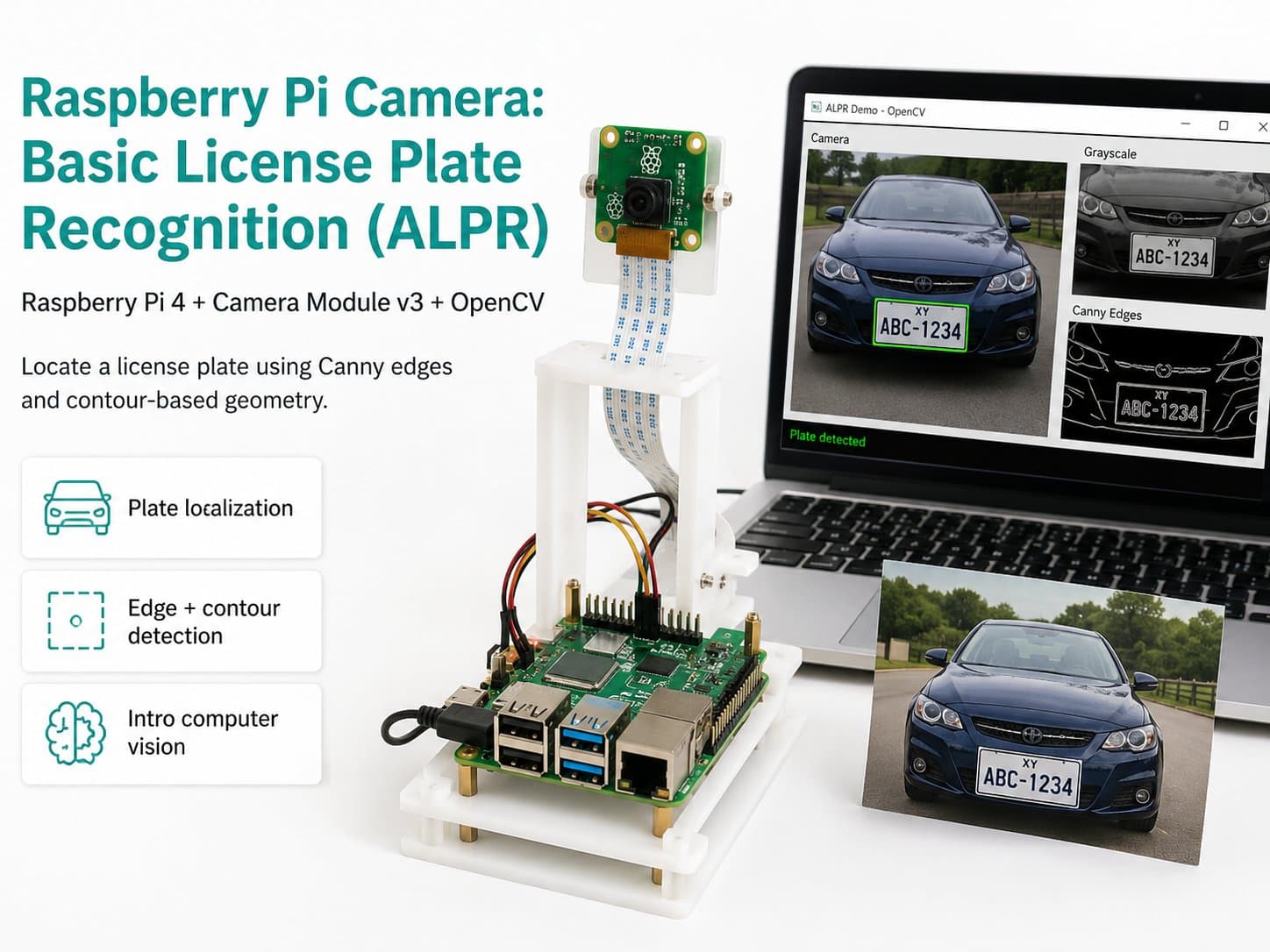
Raspberry Pi Camera: Basic License Plate Recognition (ALPR)
Uses a Raspberry Pi 4 + Camera Module v3 and OpenCV (Canny edge detection + contours) to locate a license plate using a geometric heuristic method — an intro step into computer vision, not a production-grade deep-learning ALPR system.
This project introduces an entry-level step into ALPR (Automatic License Plate Recognition) on a Raspberry Pi 4 with a Camera Module v3, using pure OpenCV with a geometric heuristic method (Canny edge detection + finding rectangular contours with a plate-like aspect ratio) to locate license plate candidates in the frame.
It doesn't use a deep-learning model, so its accuracy and robustness to lighting/angle are much lower than commercial ALPR systems (which rely on dedicated CNN/OCR models).
It's an exercise for understanding a classic image-processing pipeline: grayscale → noise reduction → edge detection → contour finding → aspect-ratio filtering, with optional OCR on the located region using pytesseract (if installed).
Detailed guide
An introductory ALPR project on Raspberry Pi 4 + Camera Module v3 using classical OpenCV heuristics (Canny edge detection + contour filtering) to locate license-plate candidate regions — a learning pipeline, not a production-grade system.
1. Introduction
This project introduces a beginner's step into ALPR (Automatic License Plate Recognition) on a Raspberry Pi 4 with a Camera Module v3, using pure OpenCV with a geometric heuristic approach (Canny edge detection + finding rectangular contours whose aspect ratio matches a license plate) to locate license-plate candidate regions in the frame.
This is not a production-grade deep-learning ALPR system — commercial ALPR systems use specialized CNNs for detection + OCR, achieving over 95% accuracy under controlled conditions. The method in this lesson only uses classical edge detection and contour geometry, so its accuracy and robustness to lighting/angle/complex backgrounds are much lower.
The goal of this article is to help you understand a classical image-processing pipeline step by step: grayscale → denoising (bilateral filter) → edge detection (Canny) → contour finding → filtering by the aspect ratio typical of license plates, before optionally running OCR on the identified region with pytesseract (if installed — the script still runs fine if it's missing, simply skipping the OCR step). Do not use this project's output for commercial or legal purposes.
2. Components Needed
| Component | Qty | Reference Price |
|---|---|---|
| Raspberry Pi 4 Model B (2/4/8GB RAM) | 1 | ~1,500,000 – 2,200,000₫ |
| Raspberry Pi Camera Module v3 (IMX708) | 1 | ~700,000 – 900,000₫ |
| 32GB microSD Card (Class 10 or higher, with Raspberry Pi OS installed) — accessory, not part of the wiring diagram | 1 | ~150,000₫ |
| USB-C 5V/3A Power Supply — accessory, not part of the wiring diagram | 1 | ~150,000₫ |
3. Wiring Diagram
| RPi Camera Module v3 | Raspberry Pi 4 |
|---|---|
| CSI (Ribbon connector) | CSI Camera Port |
| SDA (I2C control) | GPIO2 / SDA1 (Pin 3) |
| SCL (I2C control) | GPIO3 / SCL1 (Pin 5) |
| 3V3 (Power) | 3V3 (Pin 1/17) |
| GND | GND |
The main connection is the 15-pin CSI ribbon cable that comes with the camera — plug it directly into the CSI port on the Raspberry Pi 4 (located between the HDMI port and the audio jack). Note the cable orientation: the side with the metal contacts must face the HDMI port; inserting it backwards is the most common cause of a "no cameras available" error. Release the plastic latch on the CSI connector before inserting the cable, feed it in, then press the latch firmly closed.
The four SDA/SCL/3V3/GND wires only apply to boards that route out extra I2C pins for autofocus control — if your module has only a plain CSI ribbon connector, skip this part; the CSI cable alone is enough. For ALPR, it's recommended to mount the camera fixed, perpendicular to the direction plates are expected to appear, to reduce perspective distortion that would throw off the aspect-ratio filtering in the contour step.
4. Example #1 — Verifying the Camera Works (Camera Self-Test)
Run this script first after mounting the camera to confirm the hardware is correctly detected before running the plate-region pipeline. The script prints a startup banner, tries to open the camera via picamera2, captures a few frames over 3 seconds, and reports the estimated FPS.
"""
camera_test.py
Kiem tra nhanh Camera Module v3 truoc khi chay bo khoanh vung bien so xe.
In banner khoi dong, mo camera qua picamera2, chup vai khung hinh, in
kich thuoc + FPS uoc tinh. Bao loi ro rang neu thieu picamera2 hoac
khong mo duoc phan cung.
"""

import sys
import time


def main() -> int:
    print("[BOOT] Raspberry Pi Basic ALPR - Camera Self-Test")
    print("[BOOT] Dang khoi tao picamera2...")

    try:
        from picamera2 import Picamera2
    except ImportError:
        print("[ERROR] Khong tim thay thu vien picamera2.")
        print("        Cai dat: sudo apt install -y python3-picamera2")
        return 1

    try:
        picam2 = Picamera2()
        config = picam2.create_preview_configuration(
            main={"size": (640, 480), "format": "RGB888"}
        )
        picam2.configure(config)
        picam2.start()
        time.sleep(1.0)
    except Exception as exc:  # noqa: BLE001
        print(f"[ERROR] Khong the khoi dong camera: {exc}")
        print("        Kiem tra: cap ribbon CSI cam dung chieu, dung chan,")
        print("        camera duoc bat trong raspi-config (Interface Options).")
        return 1

    frame_count = 0
    start = time.monotonic()
    test_duration_s = 3.0

    while time.monotonic() - start < test_duration_s:
        frame = picam2.capture_array()
        frame_count += 1
        if frame_count == 1:
            print(f"[OK] Khung hinh dau tien: shape={frame.shape}, dtype={frame.dtype}")

    elapsed = time.monotonic() - start
    fps = frame_count / elapsed if elapsed > 0 else 0.0
    print(f"[OK] Da chup {frame_count} khung hinh trong {elapsed:.2f}s (~{fps:.1f} FPS)")

    picam2.stop()
    print("[DONE] Camera hoat dong binh thuong.")
    return 0


if __name__ == "__main__":
    sys.exit(main())
5. Example #2 — The Main Application: Heuristic Plate-Region Detection (plate_region_detector.py)
The main loop runs the pipeline: grayscale → bilateralFilter for edge-preserving denoising → Canny edge detection → findContours to find outlines → filter by minimum area and the aspect ratio (width/height) typical of a license plate (1.5–6.0) to select candidate regions. If pytesseract is available, it attempts OCR on the largest candidate region (optional — an OCR failure won't crash the program).
The script follows the required simulation conventions: a startup banner, bounded retries when opening the camera fails, skipping bad frames, and periodic JSON telemetry every 5 seconds clearly labeled with "method": "heuristic_canny_contour_NOT_deep_learning" so no one mistakes this for production ALPR.
"""
plate_region_detector.py
Ung dung chinh: khoanh vung UNG VIEN la bien so xe trong khung hinh, dung
Raspberry Pi 4 + Camera Module v3 + OpenCV thuan (KHONG deep-learning).

CANH BAO QUAN TRONG: day la phuong phap heuristic hinh hoc co ban
(Canny edge detection + tim contour hinh chu nhat co ty le khung giong
bien so), phuc vu muc dich hoc tap pipeline xu ly anh co dien. Do chinh
xac VA DO BEN thap hon nhieu so voi he ALPR thuong mai (dung CNN/OCR
chuyen biet, thuong dat >95% trong dieu kien kiem soat). Anh sang yeu,
goc chup nghieng, bien so mo/ban, hoac nen phuc tap (nhieu duong thang
ngang doc khac) se lam tang so luong ung vien sai (false positive).
Khong dung ket qua cua script nay cho muc dich thuong mai/phap ly.

Hanh vi mo phong quan sat duoc:
  - In banner ngay sau khi console san sang.
  - Retry co gioi han khi mo camera that bai (khong while vo han).
  - Khung hinh loi -> bo qua, khong crash.
  - OCR (pytesseract) la TUY CHON: neu chua cai, van chay binh thuong,
    chi bao "ocr_text": null trong telemetry.
  - In telemetry JSON dinh ky.
"""

from __future__ import annotations

import json
import time
from typing import List, Optional, Tuple

FRAME_WIDTH = 640
FRAME_HEIGHT = 480
TELEMETRY_INTERVAL_S = 5.0
CAMERA_RETRY_INTERVAL_S = 3.0
CAMERA_MAX_RETRIES = 5

# Ty le khung (width/height) dien hinh cua bien so xe may/oto VN,
# noi long bien do de bu sai so goc chup.
MIN_ASPECT_RATIO = 1.5
MAX_ASPECT_RATIO = 6.0
MIN_CONTOUR_AREA = 800

Box = Tuple[int, int, int, int]


def open_camera():
    from picamera2 import Picamera2

    for attempt in range(1, CAMERA_MAX_RETRIES + 1):
        try:
            picam2 = Picamera2()
            config = picam2.create_preview_configuration(
                main={"size": (FRAME_WIDTH, FRAME_HEIGHT), "format": "RGB888"}
            )
            picam2.configure(config)
            picam2.start()
            time.sleep(0.5)
            print(f"[BOOT] Camera san sang sau {attempt} lan thu.")
            return picam2
        except Exception as exc:  # noqa: BLE001
            print(f"[WARN] Lan thu {attempt}/{CAMERA_MAX_RETRIES} mo camera that bai: {exc}")
            if attempt < CAMERA_MAX_RETRIES:
                time.sleep(CAMERA_RETRY_INTERVAL_S)

    print("[ERROR] Khong mo duoc camera sau nhieu lan thu, dung chuong trinh.")
    return None


def find_plate_candidates(frame) -> List[Box]:
    """Pipeline heuristic: grayscale -> blur -> Canny -> contour -> loc ty le khung.

    Tra ve danh sach box (x, y, w, h) la UNG VIEN, khong dam bao dung 100%.
    """
    import cv2

    if frame is None or frame.size == 0:
        return []

    bgr = cv2.cvtColor(frame, cv2.COLOR_RGB2BGR)
    gray = cv2.cvtColor(bgr, cv2.COLOR_BGR2GRAY)
    blurred = cv2.bilateralFilter(gray, 11, 17, 17)  # khu nhieu, giu bien ro
    edges = cv2.Canny(blurred, 30, 200)

    contours, _hierarchy = cv2.findContours(edges, cv2.RETR_LIST, cv2.CHAIN_APPROX_SIMPLE)

    candidates: List[Box] = []
    for contour in contours:
        area = cv2.contourArea(contour)
        if area < MIN_CONTOUR_AREA:
            continue

        x, y, w, h = cv2.boundingRect(contour)
        if h == 0:
            continue

        aspect_ratio = w / float(h)
        if MIN_ASPECT_RATIO <= aspect_ratio <= MAX_ASPECT_RATIO:
            candidates.append((x, y, w, h))

    return candidates


def try_ocr(frame, box: Box) -> Optional[str]:
    """OCR tuy chon bang pytesseract. Tra ve None neu khong co thu vien
    hoac OCR that bai - KHONG lam crash chuong trinh chinh.
    """
    try:
        import pytesseract
        import cv2
    except ImportError:
        return None

    try:
        x, y, w, h = box
        bgr = cv2.cvtColor(frame, cv2.COLOR_RGB2BGR)
        crop = bgr[y : y + h, x : x + w]
        gray_crop = cv2.cvtColor(crop, cv2.COLOR_BGR2GRAY)
        text = pytesseract.image_to_string(
            gray_crop, config="--psm 7 -c tessedit_char_whitelist=ABCDEFGHIKLMNPSTUVXYZ0123456789.-"
        )
        cleaned = text.strip()
        return cleaned if cleaned else None
    except Exception:  # noqa: BLE001 - OCR loi khong duoc lam sap he thong
        return None


def build_telemetry(total_frames: int, candidates_count: int, ocr_text: Optional[str]) -> str:
    payload = {
        "ts": time.strftime("%Y-%m-%dT%H:%M:%S"),
        "total_frames_processed": total_frames,
        "candidates_this_frame": candidates_count,
        "ocr_text": ocr_text,
        "method": "heuristic_canny_contour_NOT_deep_learning",
    }
    return json.dumps(payload, ensure_ascii=False)


def main() -> int:
    print("[BOOT] Raspberry Pi Basic ALPR khoi dong...")
    print("[BOOT] LUU Y: day la phuong phap heuristic hoc tap, khong phai ALPR san xuat.")

    try:
        import cv2  # noqa: F401
    except ImportError:
        print("[ERROR] Thieu thu vien opencv-python. Cai dat: pip install opencv-python")
        return 1

    picam2 = open_camera()
    if picam2 is None:
        return 1

    total_frames = 0
    last_telemetry_at = time.monotonic()

    try:
        while True:
            try:
                frame = picam2.capture_array()
                total_frames += 1
            except Exception as exc:  # noqa: BLE001
                print(f"[WARN] Loi doc khung hinh, bo qua: {exc}")
                frame = None

            candidates: List[Box] = []
            ocr_text: Optional[str] = None

            if frame is not None:
                candidates = find_plate_candidates(frame)
                if candidates:
                    best_box = max(candidates, key=lambda b: b[2] * b[3])
                    ocr_text = try_ocr(frame, best_box)
                    print(f"[DETECT] {len(candidates)} ung vien, box lon nhat={best_box}, ocr={ocr_text!r}")

            now = time.monotonic()
            if now - last_telemetry_at >= TELEMETRY_INTERVAL_S:
                print(build_telemetry(total_frames, len(candidates), ocr_text))
                last_telemetry_at = now

            time.sleep(0.1)  # pipeline nang hon nen giam toc do vong lap
    except KeyboardInterrupt:
        print("[STOP] Nhan Ctrl+C, dang dung...")
    finally:
        picam2.stop()
        print(f"[DONE] Da xu ly {total_frames} khung hinh.")

    return 0


if __name__ == "__main__":
    raise SystemExit(main())
6. Example #3 — An Offline Batch-Processing Tool (batch_process.py)
A standalone tool that doesn't need a live camera: it scans a folder of pre-saved images (.jpg/.png), reruns the exact same heuristic pipeline from plate_region_detector.py on each image, and writes the results (candidate count, largest box, OCR result if any) to a CSV file.
Useful for quickly testing the algorithm against a sample image set without setting up a real Raspberry Pi and camera — supporting offline development/evaluation before deploying to hardware.
"""
batch_process.py
Cong cu chay OFFLINE (khong can camera song): quet mot thu muc anh da luu
san (.jpg/.png), chay lai pipeline heuristic trong plate_region_detector.py
tren tung anh, va ghi ket qua (so ung vien, box lon nhat) ra file CSV.

Huu ich de kiem thu nhanh thuat toan voi bo anh mau ma khong can dung
Raspberry Pi that hoac camera that - ho tro phat trien/danh gia offline.
"""

from __future__ import annotations

import argparse
import csv
import glob
import os
import time
from typing import List, Optional

from plate_region_detector import find_plate_candidates, try_ocr, Box

IMAGE_EXTENSIONS = (".jpg", ".jpeg", ".png")


def list_images(folder: str) -> List[str]:
    paths: List[str] = []
    for ext in IMAGE_EXTENSIONS:
        paths.extend(glob.glob(os.path.join(folder, f"*{ext}")))
    return sorted(paths)


def process_folder(input_folder: str, output_csv: str) -> int:
    import cv2

    image_paths = list_images(input_folder)
    print(f"[BOOT] Tim thay {len(image_paths)} anh trong '{input_folder}'")

    if not image_paths:
        print("[WARN] Khong co anh nao de xu ly, dung.")
        return 0

    processed = 0
    with open(output_csv, "w", newline="", encoding="utf-8") as csv_file:
        writer = csv.writer(csv_file)
        writer.writerow(["timestamp_iso", "image_path", "candidates_count", "best_box", "ocr_text"])

        for path in image_paths:
            bgr = cv2.imread(path)
            if bgr is None:
                print(f"[WARN] Khong doc duoc anh, bo qua: {path}")
                continue

            frame_rgb = cv2.cvtColor(bgr, cv2.COLOR_BGR2RGB)
            candidates = find_plate_candidates(frame_rgb)

            best_box: Optional[Box] = None
            ocr_text: Optional[str] = None
            if candidates:
                best_box = max(candidates, key=lambda b: b[2] * b[3])
                ocr_text = try_ocr(frame_rgb, best_box)

            timestamp_iso = time.strftime("%Y-%m-%dT%H:%M:%S")
            writer.writerow([timestamp_iso, path, len(candidates), best_box, ocr_text])
            processed += 1
            print(f"[OK] {path}: {len(candidates)} ung vien, best_box={best_box}, ocr={ocr_text!r}")

    print(f"[DONE] Da xu ly {processed}/{len(image_paths)} anh. Ket qua: {output_csv}")
    return 0


def main() -> int:
    parser = argparse.ArgumentParser(description="Chay heuristic ALPR offline tren thu muc anh")
    parser.add_argument("--input-folder", default="./sample_plates", help="Thu muc chua anh .jpg/.png")
    parser.add_argument("--output-csv", default="alpr_batch_results.csv", help="File CSV ket qua")
    args = parser.parse_args()

    try:
        import cv2  # noqa: F401
    except ImportError:
        print("[ERROR] Thieu thu vien opencv-python. Cai dat: pip install opencv-python")
        return 1

    if not os.path.isdir(args.input_folder):
        print(f"[ERROR] Thu muc khong ton tai: {args.input_folder}")
        return 1

    return process_folder(args.input_folder, args.output_csv)


if __name__ == "__main__":
    raise SystemExit(main())
7. Common Issues
| Issue | Cause | Fix |
|---|---|---|
| "no cameras available" / camera not detected | The CSI ribbon cable is inserted backwards or the latch isn't fully closed | Remove the cable, check that the metal contacts face the HDMI port, reinsert, and close the latch firmly |
| ImportError: No module named picamera2 | The picamera2 library isn't installed | Install it with sudo apt install -y python3-picamera2 |
| Too many false-positive candidates in one frame | A complex background with many horizontal/vertical lines (tiles, door frames, signage...) gets misread by Canny as edges | Narrow the region of interest (ROI) before running the pipeline, raise the MIN_CONTOUR_AREA threshold, or tighten the MIN_ASPECT_RATIO/MAX_ASPECT_RATIO range |
| No plate detected even though a vehicle is in frame | Low light, a dirty/blurry plate, or an oblique shooting angle distorting the aspect ratio | Improve lighting, mount the camera more perpendicular to the plate's expected orientation, or loosen the aspect-ratio range to fit the actual mounting angle |
| OCR returns garbage or None even though the plate region was located correctly | pytesseract/the Tesseract OCR engine isn't installed, or the cropped image is too small/blurry for accurate OCR | Install with pip install pytesseract and sudo apt install -y tesseract-ocr; if accuracy is still poor, accept this as a limitation of the heuristic method — consider a dedicated OCR/ALPR model for a real deployment |
| FPS is much lower than the other two camera projects in the series | The Canny + findContours pipeline is much heavier than HOG/pyzbar, especially with OCR enabled | Lower the frame resolution, run OCR less often (every few frames instead of every frame), or use batch_process.py for offline processing instead of real-time |
8. Summary
This lesson demonstrates a complete classical image-processing pipeline, from Canny edge detection to geometric contour filtering, to locate license-plate regions on a Raspberry Pi 4 without any deep-learning model.
It's a good learning tool for understanding how classical computer vision works before moving on to modern models, but it is not a suitable replacement for production ALPR: accuracy depends heavily on lighting, shooting angle, and background complexity.
If you need high, consistent accuracy across varied real-world conditions, the right next step is a deep-learning-based plate-detection model (a YOLO model trained specifically for plates) paired with dedicated OCR, rather than extending the geometric heuristic further.