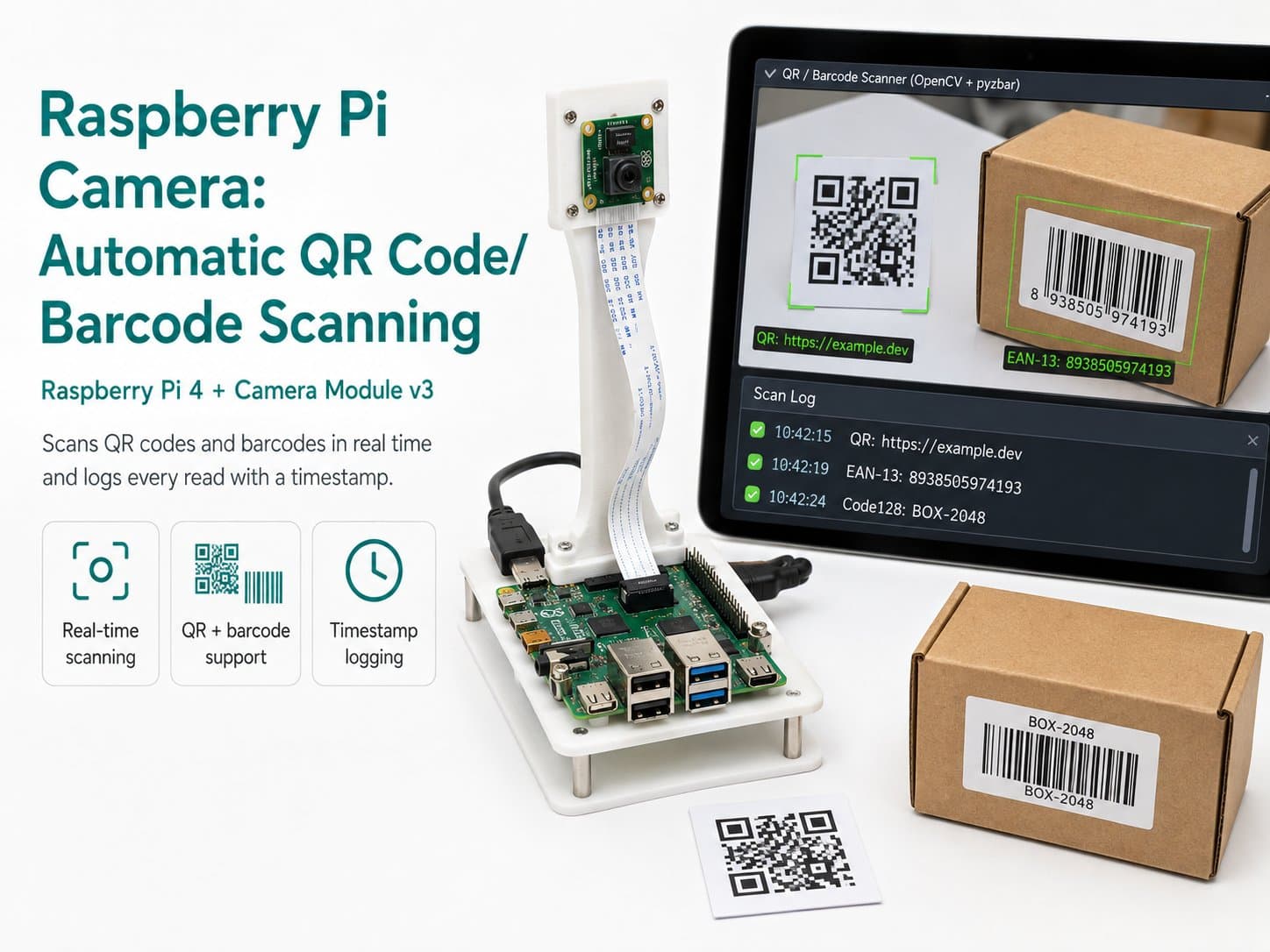
Raspberry Pi Camera: Automatic QR Code/Barcode Scanning
Uses a Raspberry Pi 4 + Camera Module v3 with the pyzbar library and OpenCV to automatically scan QR codes and common barcode formats (EAN-13, Code128, etc.) in real time, logging each scan with a timestamp.
This project turns a Raspberry Pi 4 and Camera Module v3 into a real-time QR/barcode reader, using the pyzbar library (a wrapper around ZBar) combined with OpenCV for decoding.
The camera continuously captures frames, pyzbar scans each one for any code region (QR Code, EAN-13, Code128, etc.), draws a bounding box around each code it finds, and prints the decoded content to the console/log.
A de-duplication filter (debounce) makes sure the same code held steady in front of the camera doesn't get logged over and over — it only logs again once the code disappears and reappears, or after a minimum interval has passed.
Detailed guide
Turn a Raspberry Pi 4 + Camera Module v3 into a real-time QR code and barcode scanner using pyzbar/ZBar, with deduplication and CSV logging of every scan.
1. Introduction
This project turns a Raspberry Pi 4 and a Camera Module v3 into a real-time QR/barcode reader, using the pyzbar library (a wrapper around the ZBar decoding library) together with OpenCV for grabbing frames.
The camera continuously captures frames, pyzbar scans each full frame for every region containing a code (QR Code, EAN-13, Code128, and many other formats ZBar supports), draws a bounding box around each code found, and prints the decoded content to the console/log.
A deduplication filter (debounce) ensures the same code held steady in front of the camera doesn't get logged repeatedly — it's only logged again once the code disappears and reappears, or after a minimum interval (3 seconds by default).
This is a lightweight pipeline requiring no model training at all — pyzbar/ZBar is a deterministic decoder that works well under most normal lighting conditions. It's well suited as a check-in scanning station, a product-code scanner, or a QR-code access reader on a Raspberry Pi.
2. Components Needed
| Component | Qty | Reference Price |
|---|---|---|
| Raspberry Pi 4 Model B (2/4/8GB RAM) | 1 | ~1,500,000 – 2,200,000₫ |
| Raspberry Pi Camera Module v3 (IMX708) | 1 | ~700,000 – 900,000₫ |
| 32GB microSD Card (Class 10 or higher, with Raspberry Pi OS installed) — accessory, not part of the wiring diagram | 1 | ~150,000₫ |
| USB-C 5V/3A Power Supply — accessory, not part of the wiring diagram | 1 | ~150,000₫ |
3. Wiring Diagram
| RPi Camera Module v3 | Raspberry Pi 4 |
|---|---|
| CSI (Ribbon connector) | CSI Camera Port |
| SDA (I2C control) | GPIO2 / SDA1 (Pin 3) |
| SCL (I2C control) | GPIO3 / SCL1 (Pin 5) |
| 3V3 (Power) | 3V3 (Pin 1/17) |
| GND | GND |
The main connection is the 15-pin CSI ribbon cable that comes with the camera — plug it directly into the CSI port on the Raspberry Pi 4 (located between the HDMI port and the audio jack).
Note the cable orientation: the side with the metal contacts must face the HDMI port; inserting it backwards is the most common cause of a "no cameras available" error. Release the plastic latch on the CSI connector before inserting the cable, feed it in, then press the latch firmly closed.
The four SDA/SCL/3V3/GND wires only apply to boards that route out extra I2C pins for autofocus control — if your module has only a plain CSI ribbon connector, skip this part; the CSI cable alone is enough.
4. Example #1 — Verifying the Camera Works (Camera Self-Test)
Run this script first after mounting the camera to confirm the hardware is correctly detected before running the scanning application. The script prints a startup banner, tries to open the camera via picamera2, captures a few frames over 3 seconds, and reports the estimated FPS.
"""
camera_test.py
Kiem tra nhanh Camera Module v3 truoc khi chay bo quet QR/Barcode.
In banner khoi dong, mo camera qua picamera2, chup vai khung hinh, in
kich thuoc + FPS uoc tinh. Bao loi ro rang neu thieu picamera2 hoac
khong mo duoc phan cung, khong treo may.
"""

import sys
import time


def main() -> int:
    print("[BOOT] Raspberry Pi QR/Barcode Scanner - Camera Self-Test")
    print("[BOOT] Dang khoi tao picamera2...")

    try:
        from picamera2 import Picamera2
    except ImportError:
        print("[ERROR] Khong tim thay thu vien picamera2.")
        print("        Cai dat: sudo apt install -y python3-picamera2")
        return 1

    try:
        picam2 = Picamera2()
        config = picam2.create_preview_configuration(
            main={"size": (640, 480), "format": "RGB888"}
        )
        picam2.configure(config)
        picam2.start()
        time.sleep(1.0)
    except Exception as exc:  # noqa: BLE001
        print(f"[ERROR] Khong the khoi dong camera: {exc}")
        print("        Kiem tra: cap ribbon CSI cam dung chieu, dung chan,")
        print("        camera duoc bat trong raspi-config (Interface Options).")
        return 1

    frame_count = 0
    start = time.monotonic()
    test_duration_s = 3.0

    while time.monotonic() - start < test_duration_s:
        frame = picam2.capture_array()
        frame_count += 1
        if frame_count == 1:
            print(f"[OK] Khung hinh dau tien: shape={frame.shape}, dtype={frame.dtype}")

    elapsed = time.monotonic() - start
    fps = frame_count / elapsed if elapsed > 0 else 0.0
    print(f"[OK] Da chup {frame_count} khung hinh trong {elapsed:.2f}s (~{fps:.1f} FPS)")

    picam2.stop()
    print("[DONE] Camera hoat dong binh thuong.")
    return 0


if __name__ == "__main__":
    sys.exit(main())
5. Example #2 — The Main Application: Real-Time QR/Barcode Scanning (qr_barcode_scanner.py)
The main loop: reads a frame from the camera, hands it to pyzbar.decode() to find and decode every QR/barcode in the frame, applies DedupeWindow so it doesn't log the same code repeatedly while it sits still in front of the camera, and writes results to CSV via ScanCsvLogger.
The script follows the required simulation conventions: a startup banner, bounded retries when opening the camera fails (no infinite loop), skipping bad frames instead of crashing, and periodic JSON telemetry every 5 seconds.
"""
qr_barcode_scanner.py
Ung dung chinh: quet QR Code va cac loai barcode pho bien (EAN-13, Code128,
...) theo thoi gian thuc, dung Raspberry Pi 4 + Camera Module v3 + pyzbar +
OpenCV (chi dung OpenCV de ve khung bao, giai ma hoan toan boi pyzbar/ZBar).

Hanh vi mo phong quan sat duoc:
  - In banner ngay sau khi console san sang.
  - Retry co gioi han khi mo camera that bai (khong while vo han).
  - Khung hinh loi -> bo qua, khong crash.
  - Debounce chong log lap (scan_logger.DedupeWindow).
  - In telemetry JSON dinh ky.
"""

from __future__ import annotations

import json
import time
from typing import Optional

from scan_logger import DedupeWindow, ScanCsvLogger

FRAME_WIDTH = 640
FRAME_HEIGHT = 480
TELEMETRY_INTERVAL_S = 5.0
CAMERA_RETRY_INTERVAL_S = 3.0
CAMERA_MAX_RETRIES = 5
DEDUPE_WINDOW_S = 3.0
CSV_LOG_PATH = "qr_barcode_scans.csv"


def open_camera():
    from picamera2 import Picamera2

    for attempt in range(1, CAMERA_MAX_RETRIES + 1):
        try:
            picam2 = Picamera2()
            config = picam2.create_preview_configuration(
                main={"size": (FRAME_WIDTH, FRAME_HEIGHT), "format": "RGB888"}
            )
            picam2.configure(config)
            picam2.start()
            time.sleep(0.5)
            print(f"[BOOT] Camera san sang sau {attempt} lan thu.")
            return picam2
        except Exception as exc:  # noqa: BLE001
            print(f"[WARN] Lan thu {attempt}/{CAMERA_MAX_RETRIES} mo camera that bai: {exc}")
            if attempt < CAMERA_MAX_RETRIES:
                time.sleep(CAMERA_RETRY_INTERVAL_S)

    print("[ERROR] Khong mo duoc camera sau nhieu lan thu, dung chuong trinh.")
    return None


def scan_frame(frame):
    """Quet 1 khung hinh, tra ve list cac ket qua pyzbar. [] neu khong co ma."""
    from pyzbar.pyzbar import decode

    if frame is None or frame.size == 0:
        return []
    return decode(frame)


def build_telemetry(total_scanned: int, last_type: Optional[str]) -> str:
    payload = {
        "ts": time.strftime("%Y-%m-%dT%H:%M:%S"),
        "total_scanned": total_scanned,
        "last_code_type": last_type,
    }
    return json.dumps(payload, ensure_ascii=False)


def main() -> int:
    print("[BOOT] Raspberry Pi QR/Barcode Scanner khoi dong...")
    print(f"[BOOT] Do phan giai khung hinh: {FRAME_WIDTH}x{FRAME_HEIGHT}")

    try:
        import cv2  # noqa: F401 - dung de ve khung bao khi debug truc quan
    except ImportError:
        print("[ERROR] Thieu thu vien opencv-python. Cai dat: pip install opencv-python")
        return 1

    try:
        from pyzbar.pyzbar import decode  # noqa: F401
    except ImportError:
        print("[ERROR] Thieu thu vien pyzbar. Cai dat: pip install pyzbar")
        print("        Yeu cau them thu vien he thong: sudo apt install -y libzbar0")
        return 1

    picam2 = open_camera()
    if picam2 is None:
        return 1

    dedupe = DedupeWindow(window_s=DEDUPE_WINDOW_S)
    logger = ScanCsvLogger(CSV_LOG_PATH)

    total_scanned = 0
    last_type: Optional[str] = None
    last_telemetry_at = time.monotonic()

    try:
        while True:
            try:
                frame = picam2.capture_array()
            except Exception as exc:  # noqa: BLE001
                print(f"[WARN] Loi doc khung hinh, bo qua: {exc}")
                frame = None

            results = scan_frame(frame) if frame is not None else []

            for result in results:
                code_type = result.type
                try:
                    data = result.data.decode("utf-8", errors="replace")
                except Exception:  # noqa: BLE001
                    data = repr(result.data)

                if dedupe.should_log(code_type, data):
                    x, y, w, h = result.rect
                    logger.log(code_type, data, (x, y, w, h))
                    total_scanned += 1
                    last_type = code_type
                    print(f"[SCAN] type={code_type} data={data!r} box=({x},{y},{w},{h})")

            now = time.monotonic()
            if now - last_telemetry_at >= TELEMETRY_INTERVAL_S:
                print(build_telemetry(total_scanned, last_type))
                last_telemetry_at = now

            time.sleep(0.05)
    except KeyboardInterrupt:
        print("[STOP] Nhan Ctrl+C, dang dung...")
    finally:
        logger.close()
        picam2.stop()
        print(f"[DONE] Tong so ma da quet: {total_scanned}")

    return 0


if __name__ == "__main__":
    raise SystemExit(main())
6. Example #3 — Support Module: Deduplication and Logging (scan_logger.py)
This module separates out two utilities that qr_barcode_scanner.py imports: DedupeWindow (only allows re-logging the same code content after a minimum interval has passed, avoiding spam when a code sits still across many consecutive frames) and ScanCsvLogger (writes every successful scan to a CSV file along with the code type, content, and bounding-box coordinates, auto-creating the file + header if it doesn't exist yet).
"""
scan_logger.py
Tien ich dung chung cho qr_barcode_scanner.py:
  - DedupeWindow: chan log lap lai cung mot noi dung ma trong khoang thoi
    gian toi thieu (debounce), tranh spam khi ma dung yen truoc camera.
  - ScanCsvLogger: ghi moi lan quet thanh cong ra file CSV (timestamp,
    loai ma, noi dung, vi tri khung bao).
"""

from __future__ import annotations

import csv
import os
import time
from typing import Dict, Tuple


class DedupeWindow:
    """Chi cho phep log lai cung 1 (type, data) sau khi qua window_s giay."""

    def __init__(self, window_s: float = 3.0) -> None:
        self.window_s = window_s
        self._last_seen: Dict[Tuple[str, str], float] = {}

    def should_log(self, code_type: str, data: str) -> bool:
        key = (code_type, data)
        now = time.monotonic()
        last = self._last_seen.get(key)
        if last is None or (now - last) >= self.window_s:
            self._last_seen[key] = now
            return True
        return False


class ScanCsvLogger:
    def __init__(self, csv_path: str) -> None:
        self.csv_path = csv_path
        is_new_file = not os.path.exists(csv_path)
        self._file = open(csv_path, "a", newline="", encoding="utf-8")
        self._writer = csv.writer(self._file)
        if is_new_file:
            self._writer.writerow(["timestamp_iso", "code_type", "data", "box_x", "box_y", "box_w", "box_h"])
            self._file.flush()

    def log(self, code_type: str, data: str, box) -> None:
        x, y, w, h = box
        timestamp_iso = time.strftime("%Y-%m-%dT%H:%M:%S")
        self._writer.writerow([timestamp_iso, code_type, data, x, y, w, h])
        self._file.flush()

    def close(self) -> None:
        self._file.close()
7. Common Issues
| Issue | Cause | Fix |
|---|---|---|
| "no cameras available" / camera not detected | The CSI ribbon cable is inserted backwards or the latch isn't fully closed | Remove the cable, check that the metal contacts face the HDMI port, reinsert, and close the latch firmly |
| ImportError: No module named pyzbar | The pyzbar library isn't installed, or the libzbar system library is missing | Install with pip install pyzbar and sudo apt install -y libzbar0 |
| ImportError: No module named picamera2 | The picamera2 library isn't installed | Install it with sudo apt install -y python3-picamera2 |
| A code in frame isn't being detected | The code is too small, blurry, has intense glare, or the shooting angle is too oblique | Bring the code closer to the camera or raise the frame resolution, avoid direct glare on the code's surface, and keep the code perpendicular to the lens |
| The same code keeps getting logged repeatedly even though it hasn't moved | The debounce interval (DEDUPE_WINDOW_S) is too short relative to the frame rate | Increase the DEDUPE_WINDOW_S value in qr_barcode_scanner.py (default 3 seconds) |
| Low FPS when multiple codes appear in frame at once | pyzbar decodes each code sequentially, costing more CPU as the count grows | Lower the frame resolution, limit the expected number of codes per frame, or increase the delay between loop iterations |
8. Summary
With a Raspberry Pi 4, a Camera Module v3, pyzbar, and a compact Python loop, you now have a real-time QR/barcode scanning station that automatically logs results to CSV with a timestamp.
Because pyzbar/ZBar is a fixed decoder (not machine learning), its results are stable and predictable under reasonable lighting and distance conditions — a strength compared to the other computer-vision approaches in this series.
You can extend this project by sending scan data to MQTT/a webhook, integrating it with an attendance system, or adding a small display for instant feedback to the user.