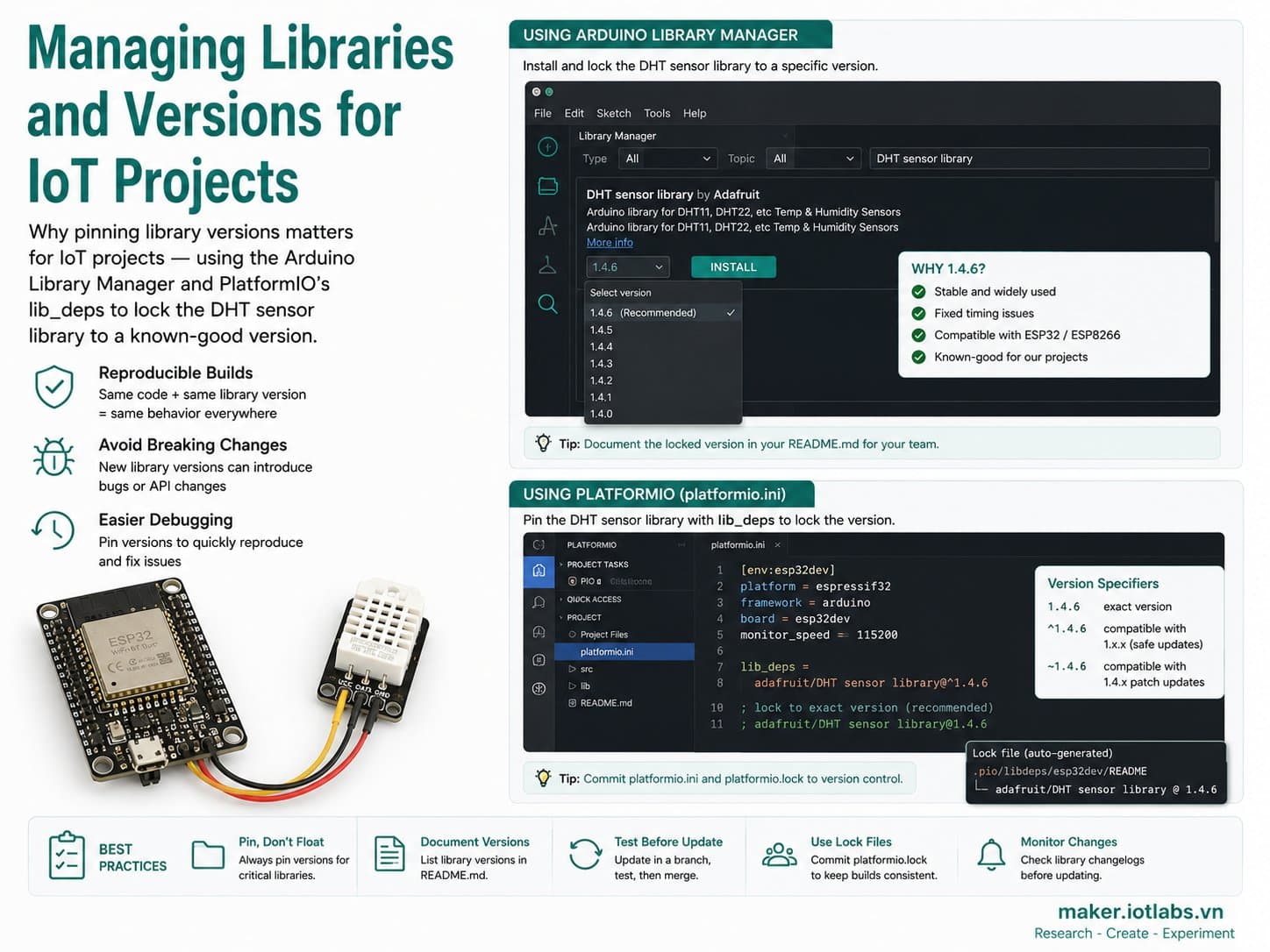
Managing Libraries and Versions for IoT Projects
Why pinning library versions matters for IoT projects — using the Arduino Library Manager and PlatformIO's lib_deps to lock the DHT sensor library to a known-good version, and avoid the classic "works on my machine" bug.
A build that works fine today can break next week simply because a library auto-updated to a new version with a breaking change. This guide explains how to manage libraries in the Arduino IDE (Library Manager) and PlatformIO (lib_deps with version pinning), using a DHT22-reading firmware that depends on the "DHT sensor library" and "Adafruit Unified Sensor" as the example.
Detailed guide
Why pinning library versions matters for IoT projects — using the Arduino Library Manager and PlatformIO's lib_deps to lock the DHT sensor library to a known-good version.
1. Introduction
A build that works fine today can break next week simply because a library auto-updated to a new version with a breaking change — this is the classic "works on my machine but not yours" bug, common when multiple people work on the same IoT project, or when you come back to an old project months later. This guide explains how to manage libraries in the Arduino IDE (Library Manager) and PlatformIO (lib_deps with version pinning), using a DHT22-reading firmware that depends on two libraries: "DHT sensor library" and "Adafruit Unified Sensor".
2. Components Needed
| Component | Qty | Reference Price |
|---|---|---|
| ESP32 DevKit V4 (ESP32-WROOM-32) | 1 | ~75,000 - 120,000₫ |
| DHT22 (AM2302) sensor | 1 | ~45,000 - 70,000₫ |
| Female-to-male jumper wires | 3 | ~5,000₫ |
3. Wiring Diagram
| DHT22 | ESP32 DevKit V4 |
|---|---|
| VCC | 3V3 |
| GND | GND |
| DATA | GPIO4 |
Power the DHT22 with 3.3V, not 5V — its DATA pin talks directly to the ESP32's 3.3V GPIO.
4. Why Library Versions Matter
The DHT22-reading firmware in this guide depends on two libraries: "DHT sensor library" (reads the DHT11/DHT22's 1-Wire protocol) and "Adafruit Unified Sensor" (the standardized interface that DHT sensor library uses internally). Without pinning a specific version:
- The Arduino Library Manager may prompt you to update to the latest version every time you open the IDE.
- A small API change in a new release (a renamed function, a different return type) can break code that used to compile fine, even though you never touched the
.inofile. - Two computers opening the same project, but installing the library at different times, will end up with different versions — making bugs very hard to reproduce when debugging together.
5. Example #1 — Managing Versions via the Arduino Library Manager
In the Arduino IDE: Sketch → Include Library → Manage Libraries (Ctrl+Shift+I). The Library Manager shows the currently installed version and lets you pick a specific version from a dropdown instead of always grabbing the latest:
Library Manager -> search "DHT sensor library" (by Adafruit)
  -> open the Version dropdown -> pick "1.4.4" instead of "Install latest"
  -> do the same for "Adafruit Unified Sensor" -> pick "1.1.9"
The Arduino IDE has no dependency-declaration file like package.json or platformio.ini — the version you pick only exists on the machine where you installed it, and isn't automatically shared with anyone else. So it's worth noting the tested version in a comment at the top of your .ino file, or in the project's README, so others know which version to install.
6. Example #2 — Pinning Versions with platformio.ini (lib_deps)
PlatformIO solves this problem outright: the library version is declared right in the config file, and travels with the project when you commit it to git:
; platformio.ini - vi du "pin" version thu vien chinh xac (khong dung dau ^)
; De tai hien duoc build sau nay, khoa dung 1 version thay vi cho phep tu dong len ban moi.
[env:esp32dev]
platform = espressif32
board = esp32dev
framework = arduino

monitor_speed = 115200

; Pin dung version (KHONG dung ^1.4.4 - dau ^ cho phep minor/patch tu do len version moi
; va co the mang breaking change ma ban khong hay biet).
lib_deps =
    adafruit/DHT sensor library@1.4.4
    adafruit/Adafruit Unified Sensor@1.1.9
Comparing the two ways to specify a version in lib_deps:
| Syntax | Meaning | When to Use It |
|---|---|---|
@1.4.4 | Pins exactly version 1.4.4, never auto-upgrades | A stable project that needs reproducible builds (production, CI) |
@^1.4.4 | Automatically takes the latest release within the same major version (1.x.x) | Active development, wanting new bugfixes without a major API change |
| No version specified | Always grabs whatever is newest at build time | Not recommended for an IoT project that needs reproducible results |
7. Example #3 — Firmware Using the Version-Pinned Libraries
// src/main.cpp - firmware doc DHT22, phu thuoc thu vien duoc pin dung version
// (xem platformio.ini: lib_deps khoa dung "1.4.4" va "1.1.9", khong dung dau ^)
#include <Arduino.h>
#include <DHT.h>

#define DHT_PIN 4
#define DHT_TYPE DHT22

DHT dht(DHT_PIN, DHT_TYPE);

unsigned long lastReadAt = 0;
const unsigned long READ_INTERVAL_MS = 2000;

void setup() {
  Serial.begin(115200);
  delay(300);
  Serial.println(F("=== Firmware voi thu vien duoc pin version ==="));
  Serial.println(F("DHT sensor library@1.4.4 + Adafruit Unified Sensor@1.1.9"));
  dht.begin();
}

void loop() {
  unsigned long now = millis();
  if (now - lastReadAt < READ_INTERVAL_MS) {
    return;
  }
  lastReadAt = now;

  float humidity = dht.readHumidity();
  float tempC = dht.readTemperature();

  if (isnan(humidity) || isnan(tempC)) {
    Serial.println(F("[WARN] Doc DHT22 that bai"));
    return;
  }

  Serial.print(F("Nhiet do: "));
  Serial.print(tempC);
  Serial.print(F(" C  |  Do am: "));
  Serial.print(humidity);
  Serial.println(F(" %"));
}
Build this project on any machine, at any time, and PlatformIO will always fetch exactly "DHT sensor library@1.4.4" and "Adafruit Unified Sensor@1.1.9" — regardless of whatever libraries that machine happened to have installed before.
8. Common Issues
| Issue | Cause | Fix |
|---|---|---|
| Old code suddenly won't compile after a library update | The Arduino IDE auto-suggested/installed a newer version with a breaking API change | Roll back to the tested version via the Library Manager, or switch to PlatformIO and pin the version |
| "Could not find library dependency" or a version-mismatch error in PlatformIO | Wrong package name, or that version doesn't exist on the registry | Double-check the name and version on registry.platformio.org, or remove the pin to get the closest available version |
| Two machines produce different build results from the same code | No version pinning — each machine installed the library at a different time | Move all dependencies to lib_deps with an explicit version |
9. Summary
Pinning library versions isn't excessive caution — it's what makes an IoT project reproducible months later, or on someone else's machine. The Arduino IDE lets you manually pick a version through the Library Manager, but doesn't save that choice with the project; PlatformIO solves this properly by declaring the version right in platformio.ini, which travels with the code when you commit it to git.