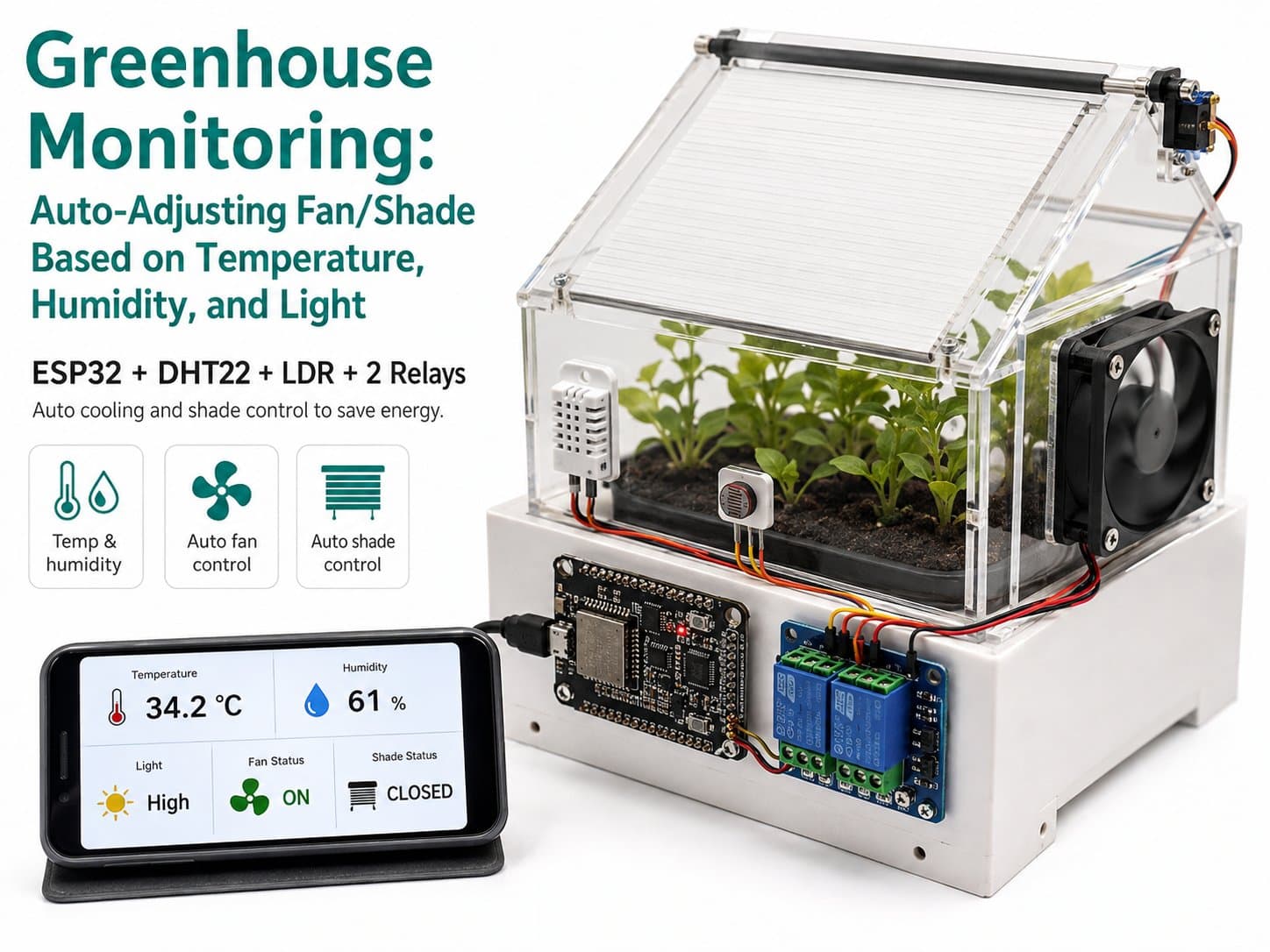
Greenhouse Monitoring: Auto-Adjusting Fan/Shade Based on Temperature, Humidity, and Light
Uses an ESP32 + DHT22 + LDR light sensor to monitor greenhouse temperature, humidity, and light, automatically switching on a cooling fan when it's too hot and closing a shade when sunlight is intense — via two relays, saving energy.
Project Overview: Smart Greenhouse Monitoring
The "Greenhouse Monitoring: auto-adjusting fan/shade based on temperature/humidity/light" project is a fun IoT application using an ESP32, a DHT22 sensor, and an LDR light sensor to monitor and control the greenhouse environment. The goal is to automate the cooling fan and shade whenever temperature or light exceed set thresholds, saving energy and keeping growing conditions optimal.
What Will You Learn?
- How to use an ESP32 to collect data from sensors.
- How to wire up and program a DHT22 sensor to measure temperature and humidity.
- How to use an LDR light sensor to detect light levels.
- How to drive relays to automatically switch the fan and shade.
- How to manage data and optimize energy use in a greenhouse system.
Key Features
- Temperature & Humidity Monitoring: Uses a DHT22 sensor to track environmental conditions.
- Light Sensing: An LDR sensor determines the greenhouse's light level.
- Automatic Control: The system turns on the cooling fan when it's hot and closes the shade when light is intense.
- ESP32 Integration: An ESP32 microcontroller connects and drives the sensors and relays.
- Energy Optimization: Minimizes power consumption while keeping ideal growing conditions for plants.
Why Is This Project Worth Building?
This project doesn't just teach core IoT concepts — it gives you hands-on skills in programming and designing automated systems. Applying technology to smart agriculture is becoming more common and meaningful for improving crop yield and quality. It also focuses on saving energy, helping protect the environment and support sustainable development. As technology advances rapidly, IoT solutions in agriculture will keep opening up new opportunities for farmers and researchers alike.
Detailed guide
Uses an ESP32 + DHT22 + LDR light sensor to monitor greenhouse temperature, humidity, and light, automatically switching on a cooling fan when it's too hot and closing a shade when sunlight is intense — via two relays, saving energy.
1. Introduction
A greenhouse helps control the microclimate for plants, but manually watching temperature, humidity, and light is labor-intensive and easy to get wrong when the weather shifts suddenly. This project uses an ESP32 with a DHT22 sensor (temperature/humidity) and an LDR light-sensor module (light) to continuously monitor conditions inside the greenhouse, then automatically switches on a cooling fan when the temperature crosses a threshold and closes a shade when sunlight is too intense, via 2 independent relays driving 2 separate loads (fan and motor/shade).
The system uses hysteresis (a different on-threshold than off-threshold) to avoid the relay rapidly cycling on/off when the sensor reading hovers near the threshold — keeping the fan and shade running longer and reducing wear on the relay contacts.
2. Components Needed
| Component | Qty | Reference Price |
|---|---|---|
| ESP32 DevKit V1 (30-pin) | 1 | ~90,000 - 120,000₫ |
| DHT22 (AM2302) — Temperature & Humidity | 1 | ~45,000 - 60,000₫ |
| LDR Module — Photoresistor Light Sensor | 1 | ~10,000 - 15,000₫ |
| 1-Channel Relay Module — 5V (fan control) | 1 | ~20,000 - 30,000₫ |
| 1-Channel Relay Module — 5V (shade/motor control) | 1 | ~20,000 - 30,000₫ |
| Jumper wires, breadboard, 5V power supply for the relays/fan | 1 set | ~20,000 - 40,000₫ |
Safety note:
The fan/shade motor typically runs off its own AC or DC power through the relay's NO/COM contact — never feed mains power directly into the ESP32.
If switching an AC load, have an experienced electrician handle the wiring and isolation.
3. Wiring Diagram
| DHT22 | ESP32 |
|---|---|
| VCC | 3V3 |
| GND | GND |
| DATA | GPIO27 |
| LDR module | ESP32 |
|---|---|
| VCC | 3V3 |
| GND | GND |
| AO (Analog Out) | GPIO34 (ADC1_CH6, input-only) |
| Relay 1 (Cooling Fan) | ESP32 |
|---|---|
| VCC | VIN (5V) |
| GND | GND |
| IN | GPIO26 |
| Relay 2 (Shade) | ESP32 |
|---|---|
| VCC | VIN (5V) |
| GND | GND |
| IN | GPIO25 |
Important note:
The relay module's coil runs on 5V — its VCC must come from the ESP32's VIN (5V) pin, NOT the 3V3 pin, or the relay won't get enough voltage to close its contacts reliably (a very common wiring mistake).
The relay's IN pin is active-low: a LOW level activates the contact.
4. Example #1 — Reading the Sensors and Printing JSON over Serial
#include <DHT.h>

#define DHTPIN     27
#define DHTTYPE    DHT22
#define LDR_PIN    34

DHT dht(DHTPIN, DHTTYPE);

void setup() {
  Serial.begin(115200);
  dht.begin();
}

void loop() {
  float humidity = dht.readHumidity();
  float tempC = dht.readTemperature();
  int lightRaw = analogRead(LDR_PIN);

  if (isnan(humidity) || isnan(tempC)) {
    Serial.println("Loi doc DHT22!");
  } else {
    Serial.print("Nhiet do: "); Serial.print(tempC); Serial.println(" *C");
    Serial.print("Do am: "); Serial.print(humidity); Serial.println(" %");
    Serial.print("Anh sang (raw ADC): "); Serial.println(lightRaw);
  }

  delay(2000); // DHT22 can toi thieu 2s giua 2 lan doc
}
5. Example #2 — Controlling a Relay with a Fixed Threshold (No Hysteresis)
#define RELAY_FAN_PIN 26
#define RELAY_ON  LOW
#define RELAY_OFF HIGH

const float TEMP_THRESHOLD = 32.0;

void setup() {
  pinMode(RELAY_FAN_PIN, OUTPUT);
  digitalWrite(RELAY_FAN_PIN, RELAY_OFF);
}

void loop() {
  float tempC = 33.5; // thay bang gia tri doc tu DHT22 thuc te
  if (tempC > TEMP_THRESHOLD) {
    digitalWrite(RELAY_FAN_PIN, RELAY_ON); // bat quat
  } else {
    digitalWrite(RELAY_FAN_PIN, RELAY_OFF); // tat quat
  }
  delay(2000);
}
6. Example #3 — The Real Application: Full Greenhouse Monitoring with Hysteresis
/*
  Giam sat nha kinh: nhiet do / do am / anh sang tu dong dieu chinh quat/mai che
  Board: ESP32 DevKit V1 (30 pins)
  Cam bien: DHT22 (nhiet do/do am), LDR module (anh sang)
  Co cau chap hanh: Relay 1 kenh x2 (quat lam mat, mai che/motor bong)

  Wiring (khop voi diagram tren IoTLabs Maker):
    DHT22   DATA -> GPIO27      VCC -> 3V3   GND -> GND
    LDR     AO   -> GPIO34 (ADC1_CH6, input-only)   VCC -> 3V3   GND -> GND
    Relay1 (quat)     IN -> GPIO26   VCC -> VIN(5V)  GND -> GND
    Relay2 (mai che)  IN -> GPIO25   VCC -> VIN(5V)  GND -> GND

  Nguong dieu khien (co the tuy chinh qua Serial hoac hard-code):
    - Bat quat khi nhiet do > TEMP_FAN_ON
    - Bat mai che (che nang) khi anh sang (LDR) > LIGHT_SHADE_ON (sang gat)
*/

#include <DHT.h>

#define DHTPIN     27
#define DHTTYPE    DHT22
#define LDR_PIN    34
#define RELAY_FAN_PIN   26
#define RELAY_SHADE_PIN 25

// Relay module active-low: LOW = kich hoat (dong tiep diem)
#define RELAY_ON  LOW
#define RELAY_OFF HIGH

const float TEMP_FAN_ON   = 32.0;  // *C - bat quat khi vuot nguong
const float TEMP_FAN_OFF  = 29.0;  // *C - tat quat (hysteresis tranh dong tat lien tuc)
const int   LIGHT_SHADE_ON  = 2800; // ADC raw (0-4095), cang lon = cang toi -> tuy module
const int   LIGHT_SHADE_OFF = 1800;

DHT dht(DHTPIN, DHTTYPE);

bool fanState = false;
bool shadeState = false;

unsigned long lastRead = 0;
const unsigned long READ_INTERVAL_MS = 2000; // DHT22 lay mau toi thieu 2s/lan

void applyRelay(int pin, bool on) {
  digitalWrite(pin, on ? RELAY_ON : RELAY_OFF);
}

void setup() {
  Serial.begin(115200);
  delay(300);
  Serial.println();
  Serial.println(F("=== Giam sat nha kinh IoTLabs - Boot OK ==="));

  pinMode(RELAY_FAN_PIN, OUTPUT);
  pinMode(RELAY_SHADE_PIN, OUTPUT);
  applyRelay(RELAY_FAN_PIN, false);
  applyRelay(RELAY_SHADE_PIN, false);

  dht.begin();
  Serial.println(F("DHT22 + LDR + 2 Relay san sang. Bat dau vong lap giam sat."));
}

void loop() {
  unsigned long now = millis();
  if (now - lastRead < READ_INTERVAL_MS) {
    return;
  }
  lastRead = now;

  float humidity = dht.readHumidity();
  float tempC = dht.readTemperature();
  int lightRaw = analogRead(LDR_PIN);

  bool dhtOk = !(isnan(humidity) || isnan(tempC));

  if (!dhtOk) {
    // Cam bien loi/chua on dinh -> bao cao degrade, khong dieu khien mu quang theo du lieu rac
    Serial.print(F("{\"temp_c\":null,\"humidity\":null,\"light_raw\":"));
    Serial.print(lightRaw);
    Serial.print(F(",\"fan\":"));
    Serial.print(fanState ? "true" : "false");
    Serial.print(F(",\"shade\":"));
    Serial.print(shadeState ? "true" : "false");
    Serial.println(F(",\"status\":\"dht_error\"}"));
    return;
  }

  // Hysteresis dieu khien quat theo nhiet do
  if (!fanState && tempC > TEMP_FAN_ON) {
    fanState = true;
    applyRelay(RELAY_FAN_PIN, true);
  } else if (fanState && tempC < TEMP_FAN_OFF) {
    fanState = false;
    applyRelay(RELAY_FAN_PIN, false);
  }

  // Hysteresis dieu khien mai che theo anh sang (raw ADC cang cao = cang toi tuy module)
  if (!shadeState && lightRaw > LIGHT_SHADE_ON) {
    shadeState = true;
    applyRelay(RELAY_SHADE_PIN, true);
  } else if (shadeState && lightRaw < LIGHT_SHADE_OFF) {
    shadeState = false;
    applyRelay(RELAY_SHADE_PIN, false);
  }

  Serial.print(F("{\"temp_c\":"));
  Serial.print(tempC, 1);
  Serial.print(F(",\"humidity\":"));
  Serial.print(humidity, 1);
  Serial.print(F(",\"light_raw\":"));
  Serial.print(lightRaw);
  Serial.print(F(",\"fan\":"));
  Serial.print(fanState ? "true" : "false");
  Serial.print(F(",\"shade\":"));
  Serial.print(shadeState ? "true" : "false");
  Serial.println(F(",\"status\":\"ok\"}"));
}
7. Common Issues
| Issue | Cause | Fix |
|---|---|---|
| DHT22 keeps returning NaN | Reading too fast (under 2s apart), no pull-up resistor on the DATA line, or the wire is too long | Make sure there's a delay of at least 2000ms between reads; add a 10kΩ pull-up resistor between DATA and VCC if using a bare sensor |
| The relay doesn't close its contact even though the GPIO is set LOW | The relay's VCC is wired to 3V3 instead of VIN (5V) — not enough voltage to energize the coil | Power the relay from the ESP32's VIN (5V) pin, not 3V3 |
| The fan/shade keeps switching on/off rapidly (relay chattering) | The on and off thresholds are the same, and the sensor reading hovers around that value | Use hysteresis: set the off-threshold a few degrees lower than the on-threshold (as in example #3) |
| The LDR reading stays the same regardless of light/dark conditions | Reading the DO (digital) pin instead of AO (analog), or the module's onboard potentiometer isn't adjusted | Use analogRead() on the AO pin; adjust the module's potentiometer if you need a wider sensing range |
8. Summary
This greenhouse monitoring system automates the two most important responses in greenhouse agriculture: cooling when it's too hot and shading when sunlight is too intense, without needing someone watching continuously. The hysteresis mechanism protects relay lifespan and avoids unnecessary control oscillation.
You can extend it by sending the JSON data over MQTT/WiFi to a dashboard for remote monitoring, or adding a soil-moisture sensor for automatic irrigation — turning this into a complete smart greenhouse system.