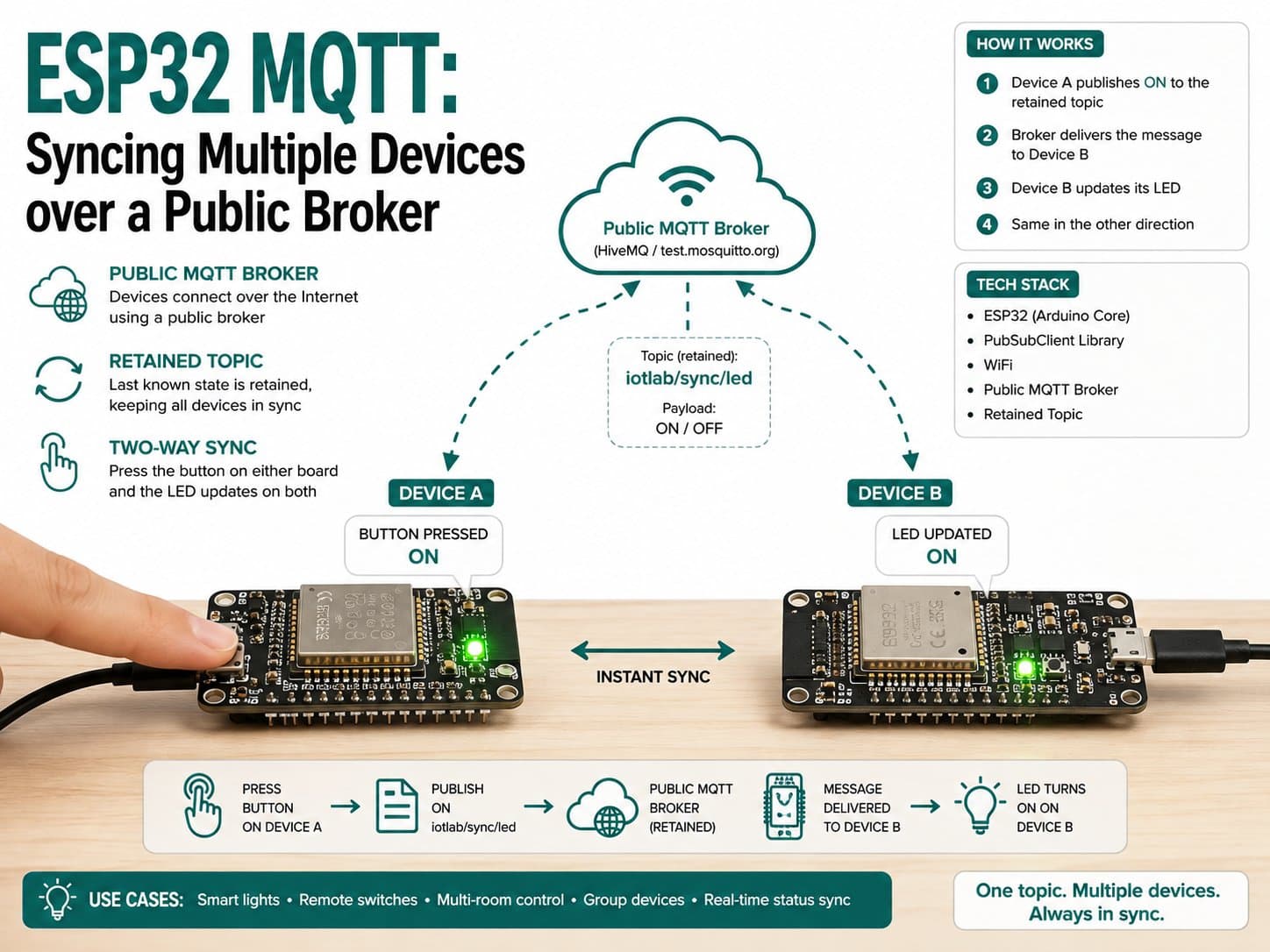
ESP32 MQTT: Syncing Multiple Devices over a Public Broker
Two ESP32 boards running the same firmware stay in sync (ON/OFF) via a retained MQTT topic on a public broker — press the button on either board and the LED on both updates.
One of the classic MQTT use cases is syncing state across multiple devices without them needing to know each other's IP address — every message flows through a central broker.
This project sets up two ESP32 boards running the exact same firmware (differing only in a DEVICE_ID constant), publishing/subscribing to the same retained state topic on a public broker. Pressing the physical button on either board syncs the LED on both, even when a board powers on later, thanks to MQTT's retained-message mechanism.
Detailed guide
Two ESP32 boards running the same firmware stay in sync (ON/OFF) via a retained MQTT topic on a public broker — press the button on either board and the LED updates.
1. Introduction
One of the classic MQTT use cases is syncing state across multiple devices without them needing to know each other's IP address — everything flows through a central broker (a publish/subscribe model, quite different from a point-to-point connection).
This project sets up two ESP32 boards running the EXACT SAME firmware (differing only in a DEVICE_ID constant), publishing/subscribing to the same retained state topic on a public broker.
Pressing the physical button on either board syncs the LED on both, even when a board powers on later — thanks to MQTT's retained-message mechanism.
Why use a "retained message" instead of a plain publish? A regular message only reaches subscribers that are online at the moment it's published. A retained message is stored by the broker and delivered immediately to any client that subscribes AFTERWARD — this is exactly the mechanism that lets a freshly-powered-on board "catch up" to the current state instead of defaulting to OFF.
2. Components Needed (×2 sets, one per board)
Component | Qty | Notes |
|---|---|---|
ESP32 DevKit V4 | 2 | Board A + Board B, running the exact same firmware file (only DEVICE_ID differs) |
LED Module — Single LED | 2 | One per board, shows the current synced state |
Push Button (Tactile Switch) | 2 | One per board, to toggle the state from that board |
3. Wiring Diagram (identical for both Board A and Board B)
Module | ESP32 DevKit V4 (each board) |
|---|---|
LED · VCC | 3V3 |
LED · GND | GND |
LED · IN | GPIO17 |
Push button · A | GPIO16 (INPUT_PULLUP) |
Push button · B | GND |
The diagram on the project page shows both boards independently (Board A and Board B) — each has its own LED and button, with NO direct wiring between the two boards (all syncing happens over WiFi + the MQTT broker, not physical wires).
4. Example #1 — Shared Firmware for Both Boards (only DEVICE_ID changes)
The complete firmware — flash this exact file to Board A; before flashing Board B, change the DEVICE_ID value to "esp32_sync_B".
/*
  ESP32 MQTT: Dong bo nhieu thiet bi qua public broker
  Board: 2x ESP32 DevKit V4 (board_esp32_devkitc) - SAME firmware flashed to
  both boards; only DEVICE_ID differs (change before flashing the 2nd board).

  Hardware (per board):
    LED module (mod_led): VCC -> 3V3, GND -> GND, IN -> GPIO17
    Push button (comp_pushbutton): pin A -> GPIO16 (INPUT_PULLUP), pin B -> GND

  Pattern: shared-state sync via a single retained topic. Both devices
  subscribe AND publish to the same state topic. Pressing the button on
  EITHER board toggles the shared state; both LEDs converge to the same
  value because the retained message is delivered to every subscriber
  (including a device that reconnects later - it immediately gets the
  last known state, not a stale default).

  Topics:
    sync/groupA/state           retained, QoS1 - "ON" or "OFF", last-write-wins
    sync/groupA/<DEVICE_ID>/status  LWT, retained, QoS1 - "online"/"offline"
*/

#include <WiFi.h>
#include <PubSubClient.h>

const char *WIFI_SSID = "YOUR_WIFI_SSID";
const char *WIFI_PASSWORD = "YOUR_WIFI_PASSWORD";
const char *MQTT_HOST = "mqtt-ce2.iotlabs.vn"; // public test broker, reference only
const uint16_t MQTT_PORT = 1883;

// CHANGE this to a different value on the 2nd board (e.g. "esp32_sync_B").
const char *DEVICE_ID = "esp32_sync_A";

const char *TOPIC_STATE = "sync/groupA/state";
char topicStatus[48]; // built at runtime from DEVICE_ID: sync/groupA/<id>/status

const int LED_PIN = 17;
const int BUTTON_PIN = 16;

const unsigned long RECONNECT_INTERVAL_MS = 5000;
const unsigned long WIFI_TIMEOUT_MS = 15000;
const unsigned long BUTTON_DEBOUNCE_MS = 250;

WiFiClient wifiClient;
PubSubClient mqttClient(wifiClient);

bool sharedState = false; // false = OFF
unsigned long lastReconnectAttempt = 0;
unsigned long lastButtonEvent = 0;
int lastButtonState = HIGH;

void applyLocalState(bool on) {
  sharedState = on;
  digitalWrite(LED_PIN, on ? HIGH : LOW);
}

void onMqttMessage(char *topic, byte *payload, unsigned int length) {
  String msg;
  for (unsigned int i = 0; i < length; i++) msg += (char)payload[i];
  Serial.printf("[mqtt][%s] %s -> %s\n", DEVICE_ID, topic, msg.c_str());

  if (String(topic) == TOPIC_STATE) {
    bool incoming = (msg == "ON");
    if (incoming != sharedState) {
      applyLocalState(incoming);
      Serial.printf("[sync] state converged to %s (from broker)\n", incoming ? "ON" : "OFF");
    }
  }
}

bool connectWifi() {
  if (WiFi.status() == WL_CONNECTED) return true;
  Serial.printf("[wifi] connecting to %s ...\n", WIFI_SSID);
  WiFi.mode(WIFI_STA);
  WiFi.begin(WIFI_SSID, WIFI_PASSWORD);
  unsigned long start = millis();
  while (WiFi.status() != WL_CONNECTED && millis() - start < WIFI_TIMEOUT_MS) {
    delay(300);
    Serial.print(".");
  }
  Serial.println();
  if (WiFi.status() == WL_CONNECTED) {
    Serial.printf("[wifi] connected, IP=%s\n", WiFi.localIP().toString().c_str());
    return true;
  }
  Serial.println("[wifi] connect timeout, will retry in main loop");
  return false;
}

bool reconnectMqtt() {
  Serial.printf("[mqtt][%s] connecting...", DEVICE_ID);
  bool ok = mqttClient.connect(
      DEVICE_ID,
      nullptr, nullptr,
      topicStatus, 1, true, "offline" // LWT
  );
  if (ok) {
    Serial.println(" connected");
    mqttClient.publish(topicStatus, "online", true);
    // Retained TOPIC_STATE (if any) arrives right after this subscribe,
    // so a device that (re)joins late still converges to the current
    // shared state instead of defaulting to OFF.
    mqttClient.subscribe(TOPIC_STATE, 1);
  } else {
    Serial.printf(" failed, rc=%d\n", mqttClient.state());
  }
  return ok;
}

void handleButtonToggle() {
  int state = digitalRead(BUTTON_PIN);
  unsigned long now = millis();
  if (state == LOW && lastButtonState == HIGH && now - lastButtonEvent > BUTTON_DEBOUNCE_MS) {
    lastButtonEvent = now;
    bool next = !sharedState;
    Serial.printf("[button][%s] toggling shared state -> %s\n", DEVICE_ID, next ? "ON" : "OFF");
    // Publish retained so late joiners (or the peer board reconnecting)
    // immediately read the latest state instead of a stale one.
    mqttClient.publish(TOPIC_STATE, next ? "ON" : "OFF", true);
    applyLocalState(next); // optimistic local update; broker echo will confirm
  }
  lastButtonState = state;
}

void setup() {
  Serial.begin(115200);
  delay(200);
  Serial.printf("\n[boot] ESP32 MQTT multi-device sync demo (device=%s)\n", DEVICE_ID);

  snprintf(topicStatus, sizeof(topicStatus), "sync/groupA/%s/status", DEVICE_ID);

  pinMode(LED_PIN, OUTPUT);
  digitalWrite(LED_PIN, LOW);
  pinMode(BUTTON_PIN, INPUT_PULLUP);

  connectWifi();

  mqttClient.setServer(MQTT_HOST, MQTT_PORT);
  mqttClient.setCallback(onMqttMessage);
  lastReconnectAttempt = 0;
}

void loop() {
  if (WiFi.status() != WL_CONNECTED) {
    connectWifi();
    delay(1000);
    return;
  }

  if (!mqttClient.connected()) {
    unsigned long now = millis();
    if (now - lastReconnectAttempt > RECONNECT_INTERVAL_MS) {
      lastReconnectAttempt = now;
      reconnectMqtt();
    }
  } else {
    mqttClient.loop();
    handleButtonToggle();
  }

  delay(10);
}
5. Example #2 — Monitoring Both Boards with mosquitto_sub
Open a terminal to watch the sync sequence between the two boards (both the shared state topic and each device's status topic):
# Watch the shared sync state
mosquitto_sub -h mqtt-ce2.iotlabs.vn -t "sync/groupA/state" -v

# Watch each device individually (wildcard +)
mosquitto_sub -h mqtt-ce2.iotlabs.vn -t "sync/groupA/+/status" -v

# Toggle manually from the terminal (simulating a "third board")
mosquitto_pub -h mqtt-ce2.iotlabs.vn -t "sync/groupA/state" -r -q 1 -m "ON"
Since a public broker like mqtt-ce2.iotlabs.vn is a GLOBAL SHARED SPACE (everyone using this broker sees each other's topics if the names collide), change groupA to a random/unique string when actually testing this, to avoid colliding with someone else testing the same sample topic.
6. Example #3 — Extending to N Devices and Avoiding Feedback Loops
With the retained + "only apply when the value actually changes" design (if (incoming != sharedState) inside onMqttMessage), this pattern naturally scales to N devices with no logic changes — every new device just needs to subscribe to the right topic to sync automatically. The key thing to preserve when scaling up:
// Quy tac chong vong lap "phan hoi" khi mo rong sang N thiet bi:
// KHONG publish lai TOPIC_STATE trong onMqttMessage() -- chi publish
// khi CHINH THIET BI NAY thay doi trang thai (vd: nguoi dung bam nut).
// Neu publish lai moi khi nhan duoc message, N thiet bi se tao vong lap
// publish-nhan-publish vo han, lam nghen broker.
if (incoming != sharedState) {
  applyLocalState(incoming); // CHI cap nhat local, KHONG publish lai
}
7. Common Issues
Issue | Cause | Fix |
|---|---|---|
The two boards don't sync — each shows a different state | Forgot to change DEVICE_ID between the two boards → both use the same MQTT client ID → the broker keeps disconnecting the older board whenever the newer one connects (a duplicate client ID can't exist twice) | Make sure DEVICE_ID is completely unique across boards |
A freshly-powered board shows the wrong initial state (defaults to OFF instead of the real state) | The state was published WITHOUT the retained flag, or the subscribe happened after the old state had already "expired" | Always publish TOPIC_STATE with retained=true; the broker will automatically resend the last value as soon as you subscribe |
The LED loops in an endless blinking cycle | The logic republishes on every received message (instead of only when the state actually changes) | Keep the if (incoming != sharedState) condition — only update/publish when the value has ACTUALLY changed |
Someone else "messes with" the state while testing on the public broker | The sync/groupA/state topic is a generic name, easy to collide with someone else's test | Switch to a topic with a unique prefix (e.g. a short UUID) when testing on a shared public broker |
8. Summary
This guide demonstrates a multi-device state-sync pattern using MQTT retained messages — a single firmware running on many boards, with no need to know each other's IP address, automatically converging on the same state even when a device joins later.
This is the foundation for larger systems: syncing lights within a room, syncing a rolling-shutter's state across multiple control points, or a dashboard aggregating the state of N devices at once.