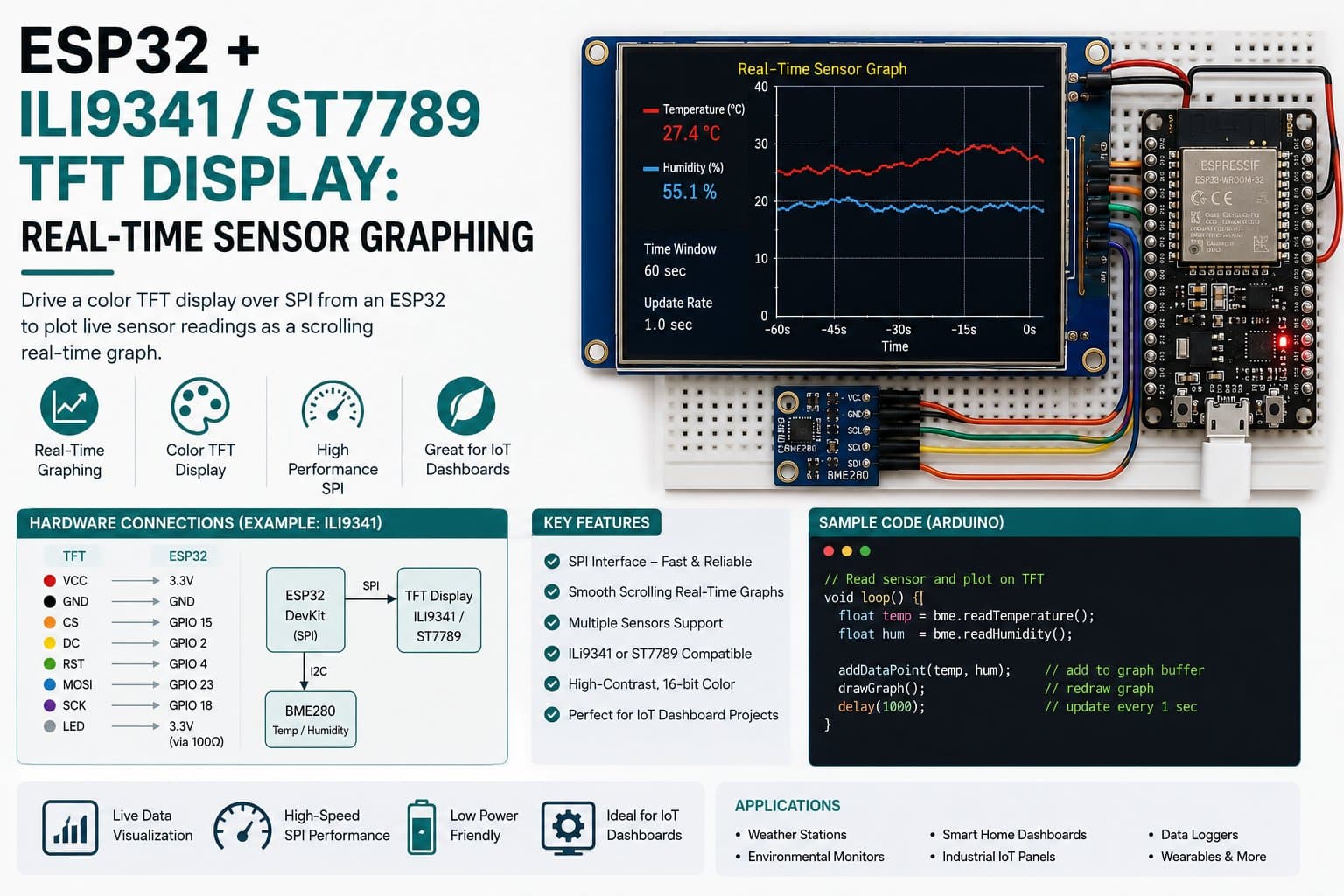
ESP32 + ILI9341/ST7789 TFT Display: Real-Time Sensor Graphing
Connect an ESP32 DevKit to a color SPI TFT display to draw a real-time line graph updating from sensor data, using the Adafruit_GFX library.
Drawing a real-time line graph on a color SPI TFT display is a useful technique for visualizing sensor data trends (temperature, humidity, light...) directly on the device, without needing an external dashboard.
This article shows how to wire an ESP32 DevKit to a color SPI TFT and write a program that samples data periodically, plotting each point in sequence to form a scrolling line graph.
Component substitution note:
This lesson's code uses a 240x320 ILI9341 since it shares the same SPI interface standard with an equivalent pinout (VCC, GND, CLK, MOSI, MISO, CS, DC, RST, BL)
The wiring diagram and circuit logic stay the same; only the driver library differs (Adafruit_ILI9341 instead of Adafruit_ST7789).
Detailed guide
Connect an ESP32 DevKit to a 2.4" SPI ILI9341 TFT (substituting for the ST7789, not yet in the hardware_catalog) and draw a real-time sensor graph with Adafruit_GFX.
1. Introduction
Drawing a real-time line graph on a color SPI TFT display is a useful technique for visualizing sensor data trends (temperature, humidity, light...) directly on the device, without needing an external dashboard. This article shows how to wire an ESP32 DevKit to a color SPI TFT and write a program that samples data periodically, plotting each point in sequence to form a scrolling line graph.
Component substitution note (important): The original lesson was planned around an ST7789 TFT, but this lesson uses an ILI9341 240x320 instead, since it shares the same SPI interface standard with an equivalent pinout (VCC, GND, CLK, MOSI, MISO, CS, DC, RST, BL) — the wiring diagram and circuit logic stay the same, only the driver library differs (Adafruit_ILI9341 instead of Adafruit_ST7789). If you have an actual ST7789 display on hand, just swap the library and constructor class — the pinout remains compatible.
2. Components Needed
| Component | Qty | Reference Price |
|---|---|---|
| ESP32 DevKit V4 (30/38 pin) | 1 | ~75,000 - 120,000₫ |
| TFT 2.4" 240x320 SPI (ILI9341) | 1 | ~90,000 - 150,000₫ |
| Female-Female Jumper Wires (9 wires) | 1 set | ~15,000₫ |
3. Wiring Diagram
The SPI TFT uses the ESP32's VSPI hardware (SCK=GPIO18, MOSI=GPIO23, MISO=GPIO19) plus 3 regular GPIO control pins (CS, DC, RST) and 1 backlight pin.
| TFT ILI9341 | ESP32 DevKit | Note |
|---|---|---|
| VCC | 3V3 | 3.3V supply — color SPI TFTs always use 3.3V logic, do NOT feed 5V |
| GND | GND | Common ground |
| CLK | GPIO18 | VSPI SCK (ESP32 default) |
| MOSI | GPIO23 | VSPI MOSI |
| MISO | GPIO19 | VSPI MISO (for reading the ID, not required for drawing only) |
| CS | GPIO5 | Chip Select |
| DC | GPIO2 | Data/Command |
| RST | GPIO4 | Reset |
| BL | GPIO15 | Backlight — GPIO-controlled, held continuously HIGH in code |
Voltage safety: color SPI TFT modules (ILI9341/ST7789/ST7735) almost always have 3.3V logic circuitry onboard — powering directly from the ESP32's 3V3 is correct, no level shifter needed.
4. Full Sample Code
The program initializes the TFT, turns on the backlight via GPIO15, then samples one sensor reading every 300ms (simulated with a sine function varying over time) and plots consecutive points connected into a line graph; once the graph fills the screen's width, the frame is cleared and redrawn from the start (scrolling by frame).
#include <SPI.h>
#include <Adafruit_GFX.h>
#include <Adafruit_ILI9341.h>

#define TFT_CS 5
#define TFT_DC 2
#define TFT_RST 4
#define TFT_BL 15

Adafruit_ILI9341 tft(TFT_CS, TFT_DC, TFT_RST);

const int GRAPH_X = 0;
const int GRAPH_Y = 40;
const int GRAPH_W = 240;
const int GRAPH_H = 180;
const int MAX_POINTS = GRAPH_W;

int16_t history[MAX_POINTS];
int historyCount = 0;
unsigned long lastSample = 0;
const unsigned long SAMPLE_INTERVAL_MS = 300;
bool tftOk = false;

float readSensorValue() {
  // Demo: gia lap tin hieu cam bien (vd ADC/nhiet do). Thay bang analogRead(pin)
  // hoac doc cam bien that (vd LM35, NTC) khi trien khai thuc te.
  float t = millis() / 1000.0f;
  float simulated = 50.0f + 30.0f * sinf(t * 0.7f) + (float)((millis() % 7) - 3);
  return simulated;
}

int valueToY(float v) {
  float vMin = 0, vMax = 100;
  if (v < vMin) v = vMin;
  if (v > vMax) v = vMax;
  int y = GRAPH_Y + GRAPH_H - (int)((v - vMin) / (vMax - vMin) * GRAPH_H);
  return y;
}

void drawGraphFrame() {
  tft.fillRect(GRAPH_X, GRAPH_Y, GRAPH_W, GRAPH_H, ILI9341_BLACK);
  tft.drawRect(GRAPH_X, GRAPH_Y, GRAPH_W, GRAPH_H, ILI9341_WHITE);
}

void setup() {
  Serial.begin(115200);
  delay(200);
  Serial.println(F("[BOOT] ESP32 TFT ILI9341 realtime graph demo starting..."));

  pinMode(TFT_BL, OUTPUT);
  digitalWrite(TFT_BL, HIGH); // bat den nen, giu sang lien tuc

  tft.begin();
  uint16_t id = tft.readcommand8(ILI9341_RDMODE);
  tftOk = true; // tft.begin() khong tra ve trang thai loi; danh dau san sang de ve.

  tft.setRotation(1);
  tft.fillScreen(ILI9341_BLACK);
  tft.setTextColor(ILI9341_WHITE);
  tft.setTextSize(2);
  tft.setCursor(0, 5);
  tft.println("IoTLabs - Realtime Graph");
  drawGraphFrame();

  Serial.println(F("[OK] TFT ILI9341 khoi tao xong, bat dau ve do thi."));
}

void loop() {
  unsigned long now = millis();
  if (now - lastSample >= SAMPLE_INTERVAL_MS) {
    lastSample = now;
    float v = readSensorValue();
    Serial.printf("[DATA] sensor=%.2f\n", v);

    if (tftOk) {
      if (historyCount >= MAX_POINTS) {
        // Cuon trai: xoa va ve lai khung khi day man hinh
        drawGraphFrame();
        historyCount = 0;
      }

      int x = GRAPH_X + historyCount;
      int y = valueToY(v);
      tft.drawPixel(x, y, ILI9341_GREEN);
      if (historyCount > 0) {
        int xPrev = GRAPH_X + historyCount - 1;
        int yPrev = valueToY(history[historyCount - 1]);
        tft.drawLine(xPrev, yPrev, x, y, ILI9341_GREEN);
      }

      history[historyCount] = (int16_t)v;
      historyCount++;
    } else {
      Serial.println(F("[WARN] TFT khong san sang, chi in Serial."));
    }
  }
}
Compile result: Sketch uses 343772 bytes (26%) of program storage space. Global variables use 24188 bytes (7%) of dynamic memory. FQBN: esp32:esp32:esp32.
5. Detailed Code Walkthrough
tft.begin()sets up the SPI communication + sends the ILI9341 driver's standard configuration command sequence; it returns no error code, so the program markstftOk = trueimmediately after calling it (unlike an I2C OLED, which has an ACK to check).valueToY()maps the sensor value (0-100) to a Y coordinate within theGRAPH_H-pixel drawing area — inverted because screen coordinates increase downward while a higher value should be drawn higher up.tft.drawLine()connects the current point to the previous one to form a continuous line instead of scattered dots.When
historyCountreachesMAX_POINTS(the graph frame's full width), the program clears and redraws the frame — a simple "scrolling" effect that avoids shifting every pixel.
6. Real Applications / Extensions
Possible extensions: (1) replace the simulated function with analogRead() reading a real light/temperature sensor; (2) use the TFT_eSPI library (configured via User_Setup.h) for significantly faster drawing than Adafruit_GFX; (3) add numeric axes and a coordinate grid for easier reading of values; (4) if you have a real ST7789 display, just change Adafruit_ILI9341 to Adafruit_ST7789 and the matching constructor class — all the graphing logic stays the same.
7. Common Issues
| Issue | Cause | Fix |
|---|---|---|
| The display is blank/shows nothing even with correct power | Wrong CS/DC/RST pin, or missing digitalWrite(TFT_BL, HIGH) | Recheck the 3 control pins and make sure the backlight is turned on |
| Compile error "Adafruit_ILI9341.h: No such file" | The library isn't installed | arduino-cli lib install "Adafruit ILI9341" |
| The image is flipped/rotated wrong | The setRotation() value doesn't match the module's mounting orientation | Try values 0-3 for tft.setRotation() until the orientation is correct |
| The graph draws slowly, with stutter | Adafruit_GFX draws pixel-by-pixel over SPI at its default speed | Switch to the TFT_eSPI library (higher SPI speed, DMA support) |
8. Summary
A color SPI TFT (ILI9341, pin-compatible with ST7789/ST7735) lets an ESP32 draw a real-time sensor-data graph directly on the device — useful for mobile monitoring stations with no external dashboard connection needed.