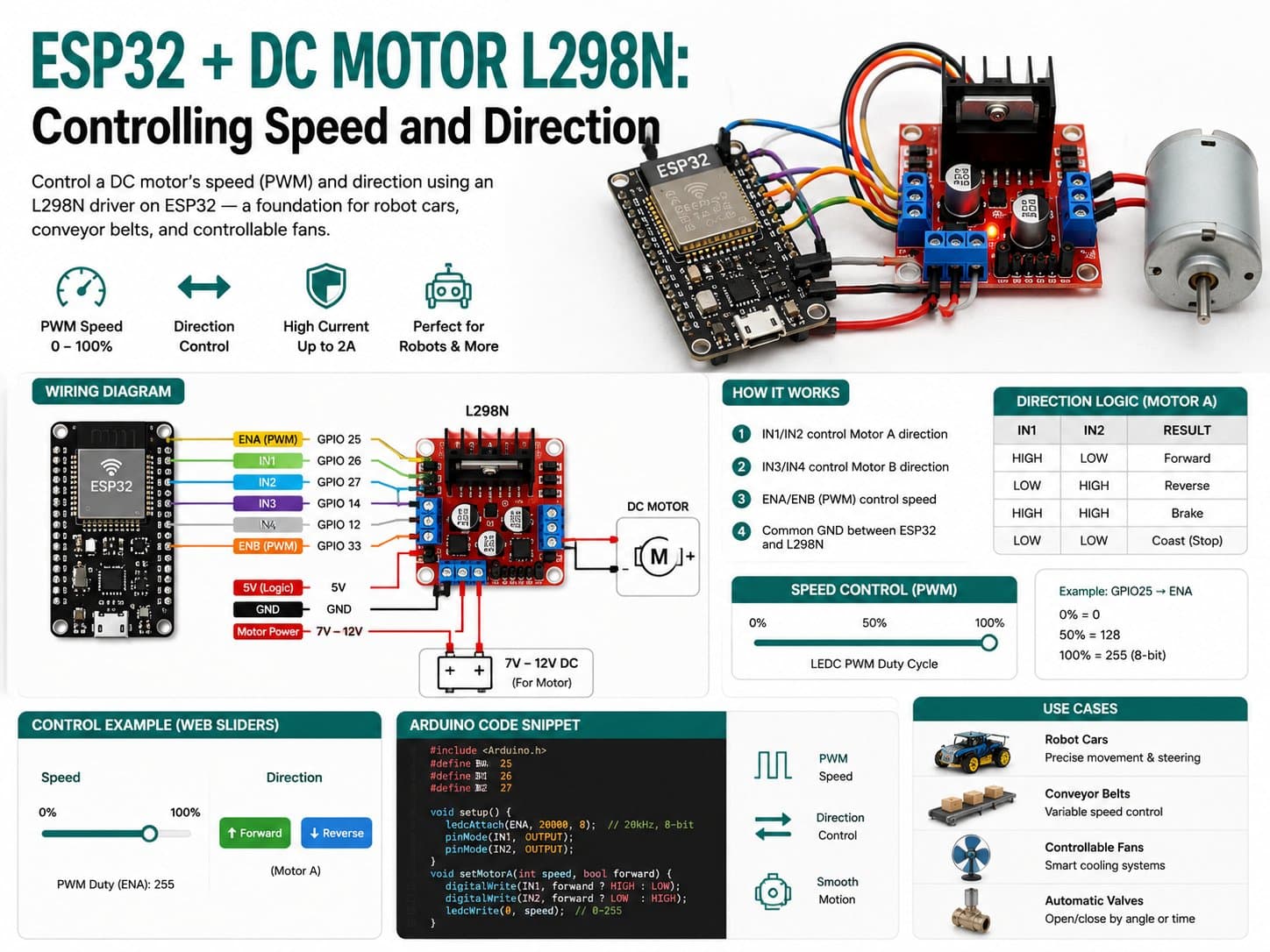
ESP32 + DC Motor L298N: Controlling Speed and Direction
Control a DC motor's speed (PWM) and direction using an L298N driver on ESP32 — a foundation for robot cars, conveyor belts, and controllable fans.
The L298N is the most popular DC motor driver for beginners learning motor control, since it packs in two H-bridges, handles up to 2A per channel, and has an onboard 5V regulator.
This project uses one channel (Motor A) of the L298N to control speed via PWM (the ENA pin through ledcAttach) and direction via two digital pins (IN1/IN2), with an automatic speed ramp demo and manual control over Serial.
Detailed guide
Control a DC motor's speed (PWM) and direction using an L298N driver on ESP32 — a foundation for robot cars, conveyor belts, and controllable fans.
1. Introduction
The L298N is the most popular DC motor driver for beginners, since it packs in two H-bridges, handles up to 2A per channel, 5V-35V motor voltage, and has an onboard 5V regulator. An H-bridge lets you reverse the current through a DC motor (changing rotation direction) and PWM-modulate it to change the average speed.
This project uses the L298N's Motor A channel: two digital pins (IN1/IN2) set the rotation direction, the ENA pin receives a PWM signal that sets the speed, with an automatic speed-ramp demo and manual control over Serial.
2. Components Needed
Component | Qty | Notes |
|---|---|---|
ESP32 DevKit V4 | 1 | The main control board |
L298N — Dual DC Motor Driver | 1 | A 2A/channel, 5V-35V driver — using channel A |
3-12V DC motor | 1 | Rated current <2A (within the L298N's limit) |
External motor power (6-12V battery/adapter) | 1 | Powers the L298N's VS pin — NOT sourced from the ESP32 |
3. Wiring Diagram
L298N pin | ESP32 pin | Notes |
|---|---|---|
VCC (logic 5V) | 5V (VIN) | Powers the driver IC's logic |
GND | GND | Must share GND with the motor supply (VS) too |
IN1 | GPIO16 | Motor A direction bit |
IN2 | GPIO17 | Motor A direction bit |
ENA | GPIO18 | 1kHz PWM controlling Motor A speed |
VS | External 6-12V supply (not connected to the ESP32) | Power supply for the motor, kept separate from the ESP32's 5V logic |
OUT1 / OUT2 | The DC motor's 2 wires | Not connected to the ESP32 — this is a power output |
GPIO16/17/18 aren't part of the boot-strapping pin group, so they're safe to use as outputs right from ESP32 boot.
4. Sample Code
/*
 * ESP32 + DC Motor L298N - Dieu khien toc do va chieu quay
 * Board: ESP32 DevKit V4 (board_esp32_devkitc)
 * Module: L298N - DC Motor Driver Dual (mod_l298n_motor), dung kenh A
 *
 * Wiring:
 *   L298N VCC (logic 5V) -> ESP32 5V (VIN)
 *   L298N GND            -> ESP32 GND (chung GND voi nguon dong co)
 *   L298N IN1            -> ESP32 GPIO16
 *   L298N IN2            -> ESP32 GPIO17
 *   L298N ENA (PWM toc do)-> ESP32 GPIO18
 *   L298N VS (motor 5V-35V) -> Nguon dong co rieng (PIN/adapter), KHONG lay tu ESP32
 *   L298N OUT1/OUT2       -> 2 day dong co DC (khong noi ve ESP32)
 *
 * An toan phan cung (checklist dong co):
 *  - L298N chiu toi da 2A/kenh - dong co DC nho (<=1A) an toan; dong co lon hon
 *    phai kiem tra dong stall trong datasheet truoc khi dau.
 *  - GND logic (ESP32) va GND motor (VS) BAT BUOC noi chung - neu khong PWM/IN
 *    se khong co muc tham chieu dung, dieu khien loi/nhieu.
 *  - L298N co diode bao ve flyback tich hop san trong IC driver (khong can diode
 *    ngoai rieng cho dong co DC chuan, khac voi relay/solenoid dung cuon day tro).
 *  - Khong cap 12V/VS truc tiep vao bat ky chan GPIO ESP32 (chi 3.3V logic).
 */

static const int IN1_PIN = 16;
static const int IN2_PIN = 17;
static const int ENA_PIN = 18;

static const int PWM_CHANNEL = 0;
static const int PWM_FREQ_HZ = 1000;
static const int PWM_RESOLUTION_BITS = 8; // 0-255

int currentSpeed = 0;      // 0-255
bool currentForward = true;

void setMotor(bool forward, int speed) {
  speed = constrain(speed, 0, 255);
  digitalWrite(IN1_PIN, forward ? HIGH : LOW);
  digitalWrite(IN2_PIN, forward ? LOW : HIGH);
  ledcWrite(PWM_CHANNEL, speed);
  currentForward = forward;
  currentSpeed = speed;
}

void stopMotor() {
  digitalWrite(IN1_PIN, LOW);
  digitalWrite(IN2_PIN, LOW);
  ledcWrite(PWM_CHANNEL, 0);
  currentSpeed = 0;
}

void setup() {
  Serial.begin(115200);
  delay(300);
  Serial.println();
  Serial.println("=== ESP32 + L298N DC Motor boot OK ===");

  pinMode(IN1_PIN, OUTPUT);
  pinMode(IN2_PIN, OUTPUT);

  ledcAttach(ENA_PIN, PWM_FREQ_HZ, PWM_RESOLUTION_BITS);
  // Note: Arduino-ESP32 core 3.x dung ledcAttach(pin, freq, resolution) va
  // ledcWrite(pin, duty) truc tiep tren so pin (khong can channel rieng nua
  // trong core moi, nhung giu bien PWM_CHANNEL de tuong thich code doc).

  stopMotor();
  Serial.println("Lenh Serial: 'F<0-255>' chay tien, 'R<0-255>' chay lui, 'S' dung.");
  Serial.println("{\"status\":\"ready\"}");
}

void handleSerialCommand() {
  if (!Serial.available()) return;
  char cmd = Serial.read();
  if (cmd == 'S' || cmd == 's') {
    stopMotor();
    Serial.println("{\"cmd\":\"stop\"}");
    return;
  }
  if (cmd == 'F' || cmd == 'f' || cmd == 'R' || cmd == 'r') {
    int val = Serial.parseInt();
    setMotor(cmd == 'F' || cmd == 'f', val);
    Serial.printf("{\"cmd\":\"%s\",\"speed\":%d}\n", (cmd == 'F' || cmd == 'f') ? "forward" : "reverse", currentSpeed);
  }
  while (Serial.available() && Serial.peek() != '\n') Serial.read();
  if (Serial.available()) Serial.read();
}

void demoRamp() {
  // Demo tu dong: tang toc tien -> giam -> tang toc lui -> giam -> dung, lap lai
  static unsigned long lastStepMs = 0;
  static int demoPhase = 0; // 0 ramp up fwd, 1 ramp down fwd, 2 ramp up rev, 3 ramp down rev
  const unsigned long STEP_MS = 40;

  if (millis() - lastStepMs < STEP_MS) return;
  lastStepMs = millis();

  switch (demoPhase) {
    case 0:
      setMotor(true, currentSpeed + 5);
      if (currentSpeed >= 255) demoPhase = 1;
      break;
    case 1:
      setMotor(true, currentSpeed - 5);
      if (currentSpeed <= 0) demoPhase = 2;
      break;
    case 2:
      setMotor(false, currentSpeed + 5);
      if (currentSpeed >= 255) demoPhase = 3;
      break;
    case 3:
      setMotor(false, currentSpeed - 5);
      if (currentSpeed <= 0) demoPhase = 0;
      break;
  }
}

void loop() {
  handleSerialCommand();
  demoRamp();

  static unsigned long lastTelemetryMs = 0;
  if (millis() - lastTelemetryMs >= 1000) {
    lastTelemetryMs = millis();
    Serial.printf("{\"direction\":\"%s\",\"speed\":%d}\n", currentForward ? "forward" : "reverse", currentSpeed);
  }
}
5. Code Walkthrough
Arduino-ESP32 core 3.x uses the new PWM API: ledcAttach(pin, freq, resolution) attaches a 1kHz/8-bit PWM signal directly to GPIO18, then ledcWrite(pin, duty) writes a 0-255 duty cycle. The setMotor(forward, speed) function
sets IN1/IN2 to opposite states to choose direction (HIGH/LOW or LOW/HIGH — if both are the same level, the motor brakes or free-spins depending on the circuit's exact behavior),
then writes the PWM value to ENA to set the speed. demoRamp() runs a 4-phase cycle: ramp up forward → ramp down forward → ramp up reverse → ramp down reverse, each step 40ms apart to simulate smooth acceleration. Serial commands like F<speed>/R<speed>/S allow manual control alongside the demo.
6. Hardware Safety Notes
The L298N handles up to 2A per channel continuously — safe with a DC motor rated under 1A; a higher-power motor needs its stall current checked in the datasheet first (the current when the motor is fully jammed, which can be 5-10x the rated current).
The logic GND (ESP32/VCC side) and the power GND (VS/motor supply side) must share a common point — otherwise the IN1/IN2/ENA signal levels lose their reference, and the driver misbehaves or doesn't respond.
The L298N has built-in flyback protection diodes inside the IC for standard DC motor windings — no separate diodes needed like when using a relay/solenoid.
Never feed the VS voltage (6-12V or higher) into any ESP32 GPIO pin — ESP32 GPIOs only tolerate 3.3V, and doing so will instantly destroy the chip.
The VS supply should be physically separate (its own battery/adapter) from the ESP32's power — sharing one weak supply can cause voltage sag and reset the ESP32 when the motor starts.
7. Common Issues
Issue | Cause | Fix |
|---|---|---|
The motor doesn't turn even though Serial reports speed > 0 | VS (power supply) isn't connected to the L298N — only the logic VCC is powered | Check that a separate 6-12V supply is connected to VS, sharing GND |
The ESP32 resets itself when the motor starts running | Sharing one weak power supply between the ESP32 and the motor, causing a sudden voltage drop | Separate the supplies: power the motor via its own battery/adapter through VS, sharing only GND |
The motor buzzes slightly but doesn't turn at low speed | The PWM duty cycle is too low to overcome the motor's static friction | Raise the minimum PWM value (typically >60/255) before the motor can start turning |
8. Summary
This guide covered using the L298N to control a DC motor's speed (PWM via ENA) and direction (IN1/IN2) on ESP32, along with key safety notes about a shared GND and separating the power supply.
This is the foundation for 2-wheel/4-wheel robot car projects, mini conveyor belts, or any application needing bidirectional DC motor control, in the Motor Control category.