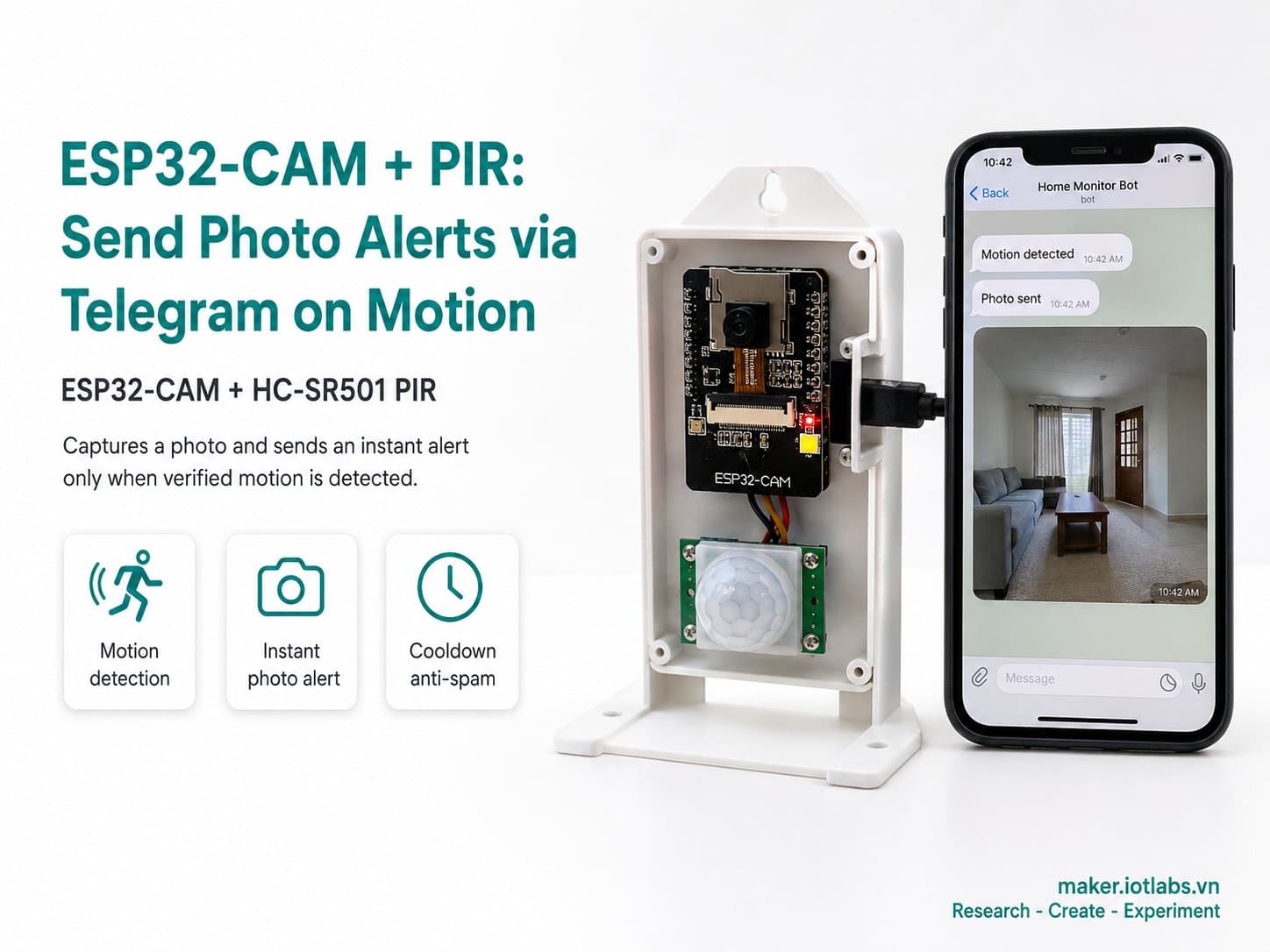
ESP32-CAM + PIR: Send Photo Alerts via Telegram on Motion
An HC-SR501 PIR sensor triggers the ESP32-CAM to take a photo and send it instantly through the Telegram Bot API (binary sendPhoto, no intermediate upload) whenever motion is detected, with a cooldown to prevent spam.
Combines an HC-SR501 PIR sensor with an ESP32-CAM to build a security alert system that sends photos straight to Telegram.
When the PIR detects motion (a rising edge on OUT), the device captures a JPEG frame and sends it via UniversalTelegramBot's sendPhotoByBinary, reading directly from the camera's frame buffer byte-by-byte with no intermediate memory allocation.
A 30-second cooldown between alerts prevents spam while the PIR output stays HIGH.
Detailed guide
An HC-SR501 PIR sensor triggers the ESP32-CAM to take a photo and send it instantly via Telegram — full 8-section guide, wiring diagram, and compile-verified code.
1. Introduction
Pairs an HC-SR501 PIR sensor with an ESP32-CAM to build a security alert system that sends photos straight to Telegram — no intermediate server, no cloud storage required.
When the PIR detects motion (a rising edge on the OUT pin), the device captures a JPEG frame and sends it directly through the Telegram Bot API using sendPhotoByBinary, reading bytes straight from the camera's frame buffer.
2. Components Needed
Component | Qty | Notes |
|---|---|---|
ESP32-CAM (AI-Thinker), OV2640 | 1 | Built-in camera + WiFi, 4MB PSRAM |
FTDI USB-to-Serial programmer | 1 | Required for flashing firmware over UART |
HC-SR501 PIR Motion Sensor | 1 | Detects motion within 3–7m, outputs digital HIGH when someone's present |
Male-to-female jumper wires | 7 | For wiring the FTDI + PIR to the ESP32-CAM |
A Telegram bot (created via @BotFather) + chat_id | 1 | Get the TELEGRAM_BOT_TOKEN and TELEGRAM_CHAT_ID before flashing the firmware |
3. Wiring Diagram
FTDI | ESP32-CAM |
|---|---|
TX | GPIO3 (RX) |
RX | GPIO1 (TX) |
GND | GND |
5V | 5V |
HC-SR501 PIR | ESP32-CAM |
|---|---|
VCC | 5V |
GND | GND |
OUT | GPIO13 |
GPIO13 was chosen because this project doesn't use an SD card (SD_MMC also uses GPIO12–15), so those pins are free to reuse as regular GPIO. If you want to use an SD card and the PIR at the same time, pick a different pin for the PIR or drop the SD card.
4. Environment Setup
Arduino IDE, board set to AI Thinker ESP32-CAM.
Install two extra libraries via the Library Manager: UniversalTelegramBot (by Brian Lough, tested with version 1.3.0) and ArduinoJson (a dependency, version 7.x).
Create a Telegram bot via @BotFather, and get the token and chat_id (message the bot, then call https://api.telegram.org/bot<TOKEN>/getUpdates to retrieve the chat_id).
5. Sample Code — PIR Trigger + Sending a Photo to Telegram
Compiles to about 1,106,177 bytes of flash (35%).
/*
  ESP32-CAM + PIR: Gui anh canh bao qua Telegram khi co chuyen dong
  Board: ESP32-CAM (AI-Thinker) + HC-SR501 PIR

  PIR.OUT -> GPIO13 (khong dung SD card trong project nay nen GPIO13/14/15
  ranh de tai su dung). Khi PIR bao HIGH (co chuyen dong), chup 1 anh JPEG
  va gui qua Telegram Bot API (sendPhoto) toi CHAT_ID cau hinh san.
  Co debounce/cooldown de tranh spam lien tuc khi PIR con "dinh" HIGH.
*/

#include "esp_camera.h"
#include "Arduino.h"
#include <WiFi.h>
#include <WiFiClientSecure.h>
#include <UniversalTelegramBot.h>

#ifndef WIFI_SSID
#define WIFI_SSID "YOUR_WIFI_SSID"
#endif
#ifndef WIFI_PASSWORD
#define WIFI_PASSWORD "YOUR_WIFI_PASSWORD"
#endif
#ifndef TELEGRAM_BOT_TOKEN
#define TELEGRAM_BOT_TOKEN "YOUR_BOT_TOKEN"
#endif
#ifndef TELEGRAM_CHAT_ID
#define TELEGRAM_CHAT_ID "YOUR_CHAT_ID"
#endif

// ---------- Chan camera co dinh cua AI-Thinker ESP32-CAM ----------
#define PWDN_GPIO_NUM     32
#define RESET_GPIO_NUM    -1
#define XCLK_GPIO_NUM      0
#define SIOD_GPIO_NUM     26
#define SIOC_GPIO_NUM     27
#define Y9_GPIO_NUM       35
#define Y8_GPIO_NUM       34
#define Y7_GPIO_NUM       39
#define Y6_GPIO_NUM       36
#define Y5_GPIO_NUM       21
#define Y4_GPIO_NUM       19
#define Y3_GPIO_NUM       18
#define Y2_GPIO_NUM        5
#define VSYNC_GPIO_NUM    25
#define HREF_GPIO_NUM     23
#define PCLK_GPIO_NUM     22

#define PIR_PIN               13
#define ALERT_COOLDOWN_MS     (30UL * 1000UL) // toi thieu 30s giua 2 lan canh bao
#define WIFI_CONNECT_TIMEOUT_MS 15000
#define WIFI_RETRY_INTERVAL_MS  30000

WiFiClientSecure secureClient;
UniversalTelegramBot bot(TELEGRAM_BOT_TOKEN, secureClient);

bool cameraReady = false;
bool wifiReady = false;
unsigned long lastAlertMs = 0;
unsigned long lastWifiAttemptMs = 0;
int lastPirState = LOW;

static bool initCamera() {
  camera_config_t config;
  config.ledc_channel = LEDC_CHANNEL_0;
  config.ledc_timer = LEDC_TIMER_0;
  config.pin_d0 = Y2_GPIO_NUM;
  config.pin_d1 = Y3_GPIO_NUM;
  config.pin_d2 = Y4_GPIO_NUM;
  config.pin_d3 = Y5_GPIO_NUM;
  config.pin_d4 = Y6_GPIO_NUM;
  config.pin_d5 = Y7_GPIO_NUM;
  config.pin_d6 = Y8_GPIO_NUM;
  config.pin_d7 = Y9_GPIO_NUM;
  config.pin_xclk = XCLK_GPIO_NUM;
  config.pin_pclk = PCLK_GPIO_NUM;
  config.pin_vsync = VSYNC_GPIO_NUM;
  config.pin_href = HREF_GPIO_NUM;
  config.pin_sscb_sda = SIOD_GPIO_NUM;
  config.pin_sscb_scl = SIOC_GPIO_NUM;
  config.pin_pwdn = PWDN_GPIO_NUM;
  config.pin_reset = RESET_GPIO_NUM;
  config.xclk_freq_hz = 20000000;
  config.pixel_format = PIXFORMAT_JPEG;

  if (psramFound()) {
    config.frame_size = FRAMESIZE_SVGA; // 800x600 - can bang toc do gui Telegram / chat luong
    config.jpeg_quality = 12;
    config.fb_count = 2;
    config.fb_location = CAMERA_FB_IN_PSRAM;
    Serial.println("[CAM] PSRAM OK -> SVGA JPEG, fb_count=2");
  } else {
    config.frame_size = FRAMESIZE_QVGA; // 320x240 khi khong co PSRAM
    config.jpeg_quality = 15;
    config.fb_count = 1;
    config.fb_location = CAMERA_FB_IN_DRAM;
    Serial.println("[CAM] Khong thay PSRAM -> giam xuong QVGA JPEG, fb_count=1");
  }

  esp_err_t err = esp_camera_init(&config);
  if (err != ESP_OK) {
    Serial.printf("[CAM] Khoi tao that bai, ma loi 0x%x\n", err);
    return false;
  }
  return true;
}

static bool connectWifi() {
  Serial.printf("[WIFI] Dang ket noi SSID '%s' ...\n", WIFI_SSID);
  WiFi.mode(WIFI_STA);
  WiFi.begin(WIFI_SSID, WIFI_PASSWORD);

  unsigned long start = millis();
  while (WiFi.status() != WL_CONNECTED && (millis() - start) < WIFI_CONNECT_TIMEOUT_MS) {
    delay(300);
    Serial.print(".");
  }
  Serial.println();

  if (WiFi.status() == WL_CONNECTED) {
    Serial.printf("[WIFI] Da ket noi, IP: %s\n", WiFi.localIP().toString().c_str());
    secureClient.setInsecure(); // demo: bo qua kiem tra cert (production nen pin cert Telegram)
    return true;
  }
  Serial.println("[WIFI] Khong ket noi duoc trong thoi gian cho, se thu lai dinh ky.");
  return false;
}

// UniversalTelegramBot::sendPhotoByBinary yeu cau con tro ham C thuan (khong
// the dung lambda co capture). Dung bien static toan cuc de callback byte-by-byte
// doc truc tiep tu camera frame buffer, khong can cap phat/copy them bo nho.
static camera_fb_t *s_telegramFb = nullptr;
static size_t s_telegramOffset = 0;

static bool telegramMoreDataAvailable() {
  return s_telegramFb != nullptr && s_telegramOffset < s_telegramFb->len;
}

static byte telegramGetNextByte() {
  byte b = s_telegramFb->buf[s_telegramOffset];
  s_telegramOffset++;
  return b;
}

static bool sendTelegramPhoto() {
  camera_fb_t *fb = esp_camera_fb_get();
  if (!fb) {
    Serial.println("[CAM] Lay khung hinh that bai, khong gui duoc canh bao.");
    return false;
  }

  Serial.printf("[TELEGRAM] Dang gui anh (%u bytes) toi chat_id=%s...\n", fb->len, TELEGRAM_CHAT_ID);

  s_telegramFb = fb;
  s_telegramOffset = 0;

  String response = bot.sendPhotoByBinary(
      TELEGRAM_CHAT_ID, "image/jpeg", fb->len,
      telegramMoreDataAvailable,
      telegramGetNextByte,
      nullptr, nullptr);

  s_telegramFb = nullptr;
  esp_camera_fb_return(fb);

  bool ok = response.indexOf("\"ok\":true") >= 0;
  if (ok) {
    Serial.println("[TELEGRAM] Gui anh thanh cong.");
  } else {
    Serial.printf("[TELEGRAM] Gui anh that bai (kiem tra token/chat_id/mang). Response: %s\n", response.c_str());
  }
  return ok;
}

void setup() {
  Serial.begin(115200);
  delay(300);
  Serial.println();
  Serial.println("=== ESP32-CAM + PIR Telegram Alert boot ===");

  pinMode(PIR_PIN, INPUT);

  cameraReady = initCamera();
  if (!cameraReady) {
    Serial.println("[CAM] Camera khong san sang, se thu lai trong loop().");
  }

  wifiReady = connectWifi();
  lastWifiAttemptMs = millis();
}

void loop() {
  unsigned long now = millis();

  if (!wifiReady && (now - lastWifiAttemptMs > WIFI_RETRY_INTERVAL_MS)) {
    wifiReady = connectWifi();
    lastWifiAttemptMs = now;
  }

  if (!cameraReady) {
    static unsigned long lastCamRetry = 0;
    if (now - lastCamRetry > 10000) {
      Serial.println("[CAM] Retry khoi tao camera...");
      cameraReady = initCamera();
      lastCamRetry = now;
    }
  }

  int pirState = digitalRead(PIR_PIN);
  if (pirState == HIGH && lastPirState == LOW) {
    Serial.println("[PIR] Phat hien chuyen dong (canh len).");
    if (cameraReady && wifiReady && (now - lastAlertMs >= ALERT_COOLDOWN_MS)) {
      lastAlertMs = now;
      sendTelegramPhoto();
    } else if (now - lastAlertMs < ALERT_COOLDOWN_MS) {
      Serial.println("[PIR] Bo qua vi con trong thoi gian cooldown.");
    } else {
      Serial.println("[PIR] Bo qua vi camera/wifi chua san sang.");
    }
  }
  lastPirState = pirState;

  delay(100);
}
6. Code Walkthrough
telegramGetNextByte() / telegramMoreDataAvailable():
UniversalTelegramBot::sendPhotoByBinaryrequires plain C function pointers (no capturing lambdas), so this uses global static variables pointing at the frame buffer and the current read offset — reading directly byte-by-byte with no intermediate memory allocation.Rising-edge debounce: only sends a photo when
pirState == HIGH && lastPirState == LOW(a rising edge), rather than repeatedly while the PIR stays HIGH.ALERT_COOLDOWN_MS (30s): blocks repeated sends during a burst of consecutive motion, preventing Telegram spam and wasted bandwidth.
secureClient.setInsecure(): skips TLS certificate verification to keep the demo simple — a production setup should pin the correct certificate for api.telegram.org.
SVGA resolution when PSRAM is available: balances alert-photo quality against Telegram upload speed (a UXGA photo would take noticeably longer to send).
7. Common Issues
Issue | Cause | Fix |
|---|---|---|
Compile error: "no matching function for sendPhotoByBinary" | Passed a capturing lambda or the wrong argument count — the library requires exactly 7 plain C function-pointer arguments | Use global static callbacks like in the sample code (don't capture local variables) |
PIR keeps triggering even when no one's around | Placed near a heat source (AC unit, a sun-lit window), or the sensitivity trimmer is set too high | Adjust the sensitivity trimmer on the HC-SR501 module, and avoid placing it near heat/airflow sources |
No photo arrives on Telegram | Wrong TELEGRAM_BOT_TOKEN/CHAT_ID, or you've never messaged the bot (Telegram blocks bots from messaging first) | Send /start to the bot first, and get the correct chat_id via getUpdates |
Sending photos is very slow or times out | Weak WiFi, or the image resolution is too high | Drop to QVGA/VGA, and place the ESP32-CAM closer to the router |
8. Summary
This project demonstrates a complete security-alert pipeline: a physical sensor (PIR) → on-device photo capture → a direct send through a third-party API (Telegram), with no backend of your own needed.
The byte-by-byte callback technique reading straight from the camera's frame buffer is a useful pattern for any library that requires plain C function pointers on the Arduino/ESP32 platform.